

Administrator or above
Sync groups and roles from your identity provider
A login connection can read two things from the ID token your identity provider issues when someone signs in: their Astrato role, and the groups they belong to. Astrato applies both at every sign-in through that connection, so the provider stays the place where you manage them.
This works for every login provider except Google Workspace, which does not offer the settings. To create users and groups before anyone signs in, or to deactivate people when they leave, use SCIM provisioning instead.
Before you start
Section titled “Before you start”- You meet the requirements in Set up single sign-on.
- You can add custom claims to the ID token in your identity provider. In Okta, for example, that needs a custom authorization server.
- You decide this before you select Create. The synchronization settings are chosen when a login connection is created; the connection’s Setup tab does not show or change them later.
What Astrato does at each sign-in
Section titled “What Astrato does at each sign-in”With Enable roles synchronization ticked, Astrato reads the claim named in ID Token Role Field Name and sets the person’s workspace role to its value.
- The value must be one of
administrator,creator,designerorviewer. Case does not matter. - Any other value, or no value, leaves the role as it was.
- The workspace owner’s role is never changed.
Groups
Section titled “Groups”With Enable groups synchronization ticked, Astrato reads the ID token’s groups claim, a list
of group names.
- If Group Prefix is set, Astrato keeps only the names that start with it and removes the
prefix. With the prefix
astrato_,astrato_Salesbecomes the group Sales andEveryoneis ignored. With no prefix, every name in the claim is used. - A name with no matching group in the workspace creates that group.
- The person is added to every group on the list.
- The person is removed from every other group in the workspace, including groups you added them to by hand. Memberships that an assignment rule gave them are kept.
Groups are matched by name, exactly. Give the groups you grant access to the same names in Astrato and in the provider (after the prefix), or let the first sign-in create them, then grant them access.
Set up the claims in your provider
Section titled “Set up the claims in your provider”How you add a claim depends on the provider; its documentation covers the screens. You need:
| Claim | Contents | Needed for |
|---|---|---|
A name of your choice, for example astrato_role |
One of administrator, creator, designer or viewer |
Role sync |
groups |
A list of the person’s group names | Group sync |
Both must be in the ID token, not only the access token. Most providers have a token preview; use it to check that a test user’s ID token carries both claims before you create the connection.
Turn synchronization on
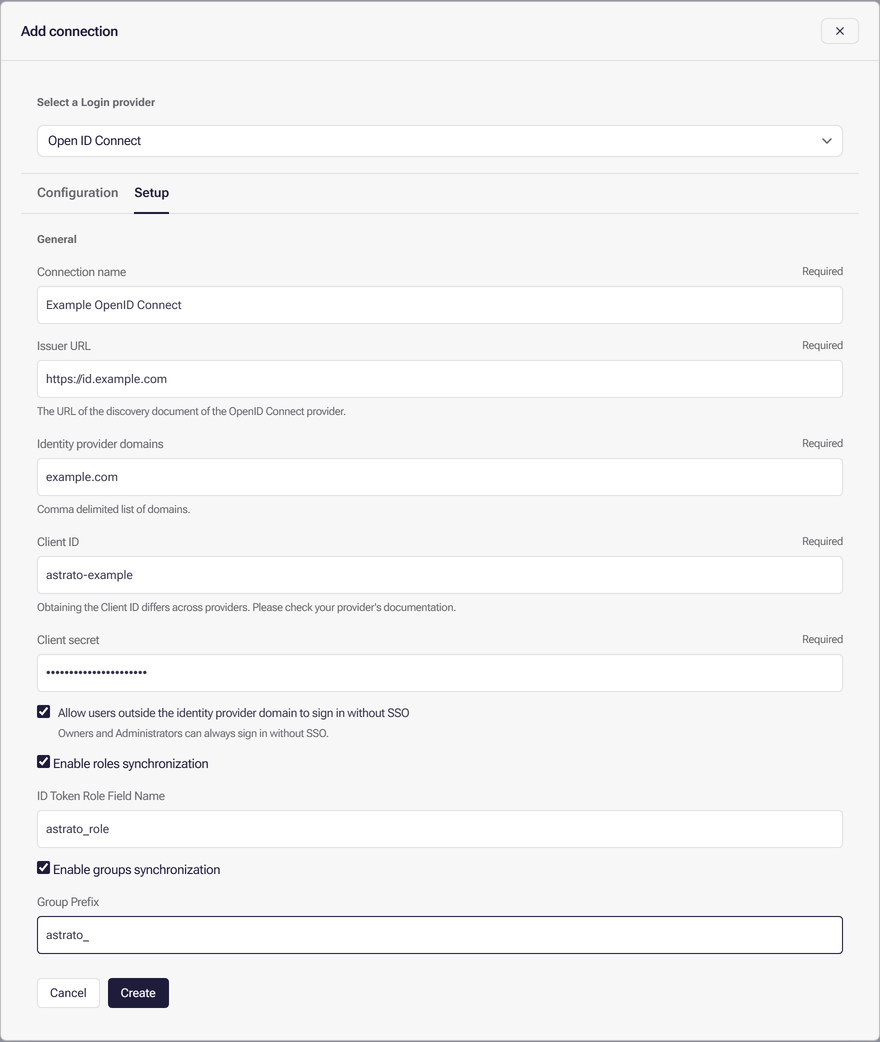
Section titled “Turn synchronization on”- In Astrato, open Administration → Enterprise Connection, select Add connection and choose your provider, as in Set up the connection.
- On Setup, fill in the connection’s values.
- To sync roles, tick Enable roles synchronization and enter the claim name in ID Token Role Field Name.
- To sync groups, tick Enable groups synchronization. Enter a Group Prefix to sync only the groups whose names start with it, or leave it empty to sync them all.
- Select Create, then verify the connection.
Check that it works
Section titled “Check that it works”- Sign in through the connection as a test user, from a private window, as in Test a normal sign-in.
- In your own session, open Administration → Users and select that user. Their role should match the claim, and under Groups they should be in the synced groups.
Changes made in the provider take effect at the person’s next sign-in through the connection.
If it does not work
Section titled “If it does not work”| What you see | Likely cause | What to do |
|---|---|---|
| The role does not change | The claim is missing, has another name, or holds a value other than the four roles | Check the ID token in the provider’s token preview and the ID Token Role Field Name |
| The role of the workspace owner does not change | The owner’s role is never synced | Nothing to fix |
| No groups appear | The ID token has no groups claim, or no name in it starts with Group Prefix |
Add the claim to the ID token, or correct the prefix |
| Someone loses a group you added by hand | Group sync removes memberships that the token does not list | Add them to the group in the provider, or use an assignment rule |
What next
Section titled “What next”- How access works, to grant the synced groups access
- Manage groups and assignment rules
- Provision users and groups with SCIM