The Objects category of the block palette holds blocks that read and set the properties of objects and sheets, and a block that exports the data behind a data object.
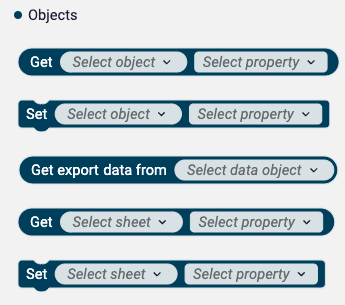

The Get [Object] [Property] block returns one property of an object, such as its size, position, frame or title. It outputs a string, a number or a boolean, depending on the property.
| Input |
Description |
| Object |
Select an object on the workbook’s sheets, or use a block that outputs an object name as a string. |
| Property |
The property to return. See Properties. |
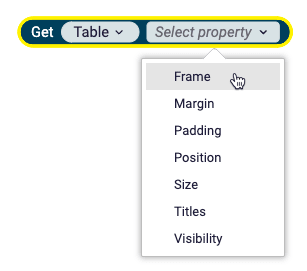
| Property |
Description |
| Frame |
See Frame properties. |
| Margin |
The margin of the object’s container, in pixels: Top, Bottom, Left or Right. |
| Padding |
The padding of the object’s container, in pixels: Top, Bottom, Left or Right. |
| Position |
The object’s position on the sheet: Left, Right, Top or Bottom, as a relative value between 0 and 100. |
| Size |
The object’s Width or Height, as a value between 0 and 100 relative to the sheet’s size. |
| Titles |
The Text or Visibility of the object’s Title, Subtitle or Footer. |
| Visibility |
Whether the object is visible or hidden on the sheet. |
| Frame property |
Description |
| Background |
The object’s background Color. |
| Opacity (%) |
The object’s opacity. |
| Border |
The border’s Color, Size in pixels, or Line style. |
| Radius |
The corner radius in pixels: how rounded the object’s corners are. |
| Feature |
Support |
| Embeds |
Yes |
| Reporting |
Yes |

The Set [Object] [Property] block changes one property of an object, such as its size, position, frame or title. The value it takes is a string, a number or a boolean, depending on the property.
| Input |
Description |
| Object |
Select an object on the workbook’s sheets, or use a block that outputs an object name as a string. |
| Property |
The property to set. See Properties. |
| Property |
Description |
| Frame |
See Frame properties. |
| Margin |
Sets the object’s margin in pixels, for All sides at once or for Top, Bottom, Left or Right. |
| Padding |
Sets the object’s padding in pixels, for All sides at once or for Top, Bottom, Left or Right. |
| Position |
Sets the object’s position on the sheet. Top, Right, Bottom and Left take a relative value between 0 and 100; Top (pixels), Right (pixels), Bottom (pixels) and Left (pixels) take pixels. |
| Size |
Sets the object’s size. Width and Height take a value between 0 and 100 relative to the sheet’s size; Width (pixels) and Height (pixels) take pixels. |
| Titles |
Sets the Text or Visibility of the object’s Title, Subtitle or Footer. |
| Visibility |
Shows or hides the object on the sheet. |
| Frame property |
Description |
| Background |
Sets the object’s background Color, as a hex code or a colour name. |
| Opacity (%) |
Sets the object’s opacity. |
| Border |
Sets the border’s Color (a hex code or a colour name), Size in pixels, or Line style. The line styles are None, Solid, Dashed, Dotted, Double and Custom; Custom takes a border style you type, such as groove. |
| Radius |
Sets the corner radius in pixels: how rounded the object’s corners are. |
| Feature |
Support |
| Embeds |
Yes |
| Reporting |
Yes |

The Get export data from [Data object] with [Date type] dates block returns the rows of a data object as a list, one list of values per row. It uses the object’s export query, so the object’s own settings, such as its filters, sorting and export limit, apply, and so do the filters applied across the workbook. Use it to pass a chart’s data on to other blocks, for example to fill a report.
| Input |
Description |
| Data object |
The data object to export. The dropdown lists the objects whose data can be exported. |
| Date type |
How date and datetime values are returned: Excel as an Excel serial date number (for example 45468.64238), Milliseconds (Epoch) as milliseconds since the Unix epoch (for example 1719321878802), or ISO as an ISO string (for example 2025-02-24). |
| Feature |
Support |
| Embeds |
Yes, where the embed is allowed to run custom SQL |
| Reporting |
Yes |
For a report that uses this block, see Excel reporting.

The Get [Sheet] [Property] block returns one property of a sheet. It outputs a string or a boolean, depending on the property.
| Input |
Description |
| Sheet |
Select a sheet from the workbook, or use a block that outputs a sheet name as a string. |
| Property |
The property to return. See below. |
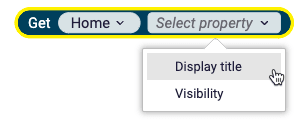
| Property |
Description |
| Display title |
The sheet’s display title. |
| Visibility |
Whether the sheet is visible. |
| Feature |
Support |
| Embeds |
Yes, workbook embeds only |
| Reporting |
Yes |

The Set [Sheet] [Property] block changes one property of a sheet: its display title or whether it is visible.
| Input |
Description |
| Sheet |
Select a sheet from the workbook, or use a block that outputs a sheet name as a string. |
| Property |
The property to set. See below. |
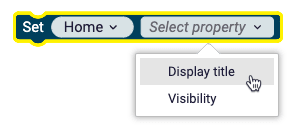
| Property |
Description |
| Display title |
Sets the sheet’s display title, as a string. |
| Visibility |
Shows or hides the sheet, as a boolean. |
| Feature |
Support |
| Embeds |
Yes, workbook embeds only |
| Reporting |
Yes |
To move between sheets rather than change them, see Navigation (Workbook).