

Object states
Show each object’s state over its host, inside its card, so the rest of the page keeps loading. The loading placeholder’s look is in Loaders; what readiness reports is in Readiness.
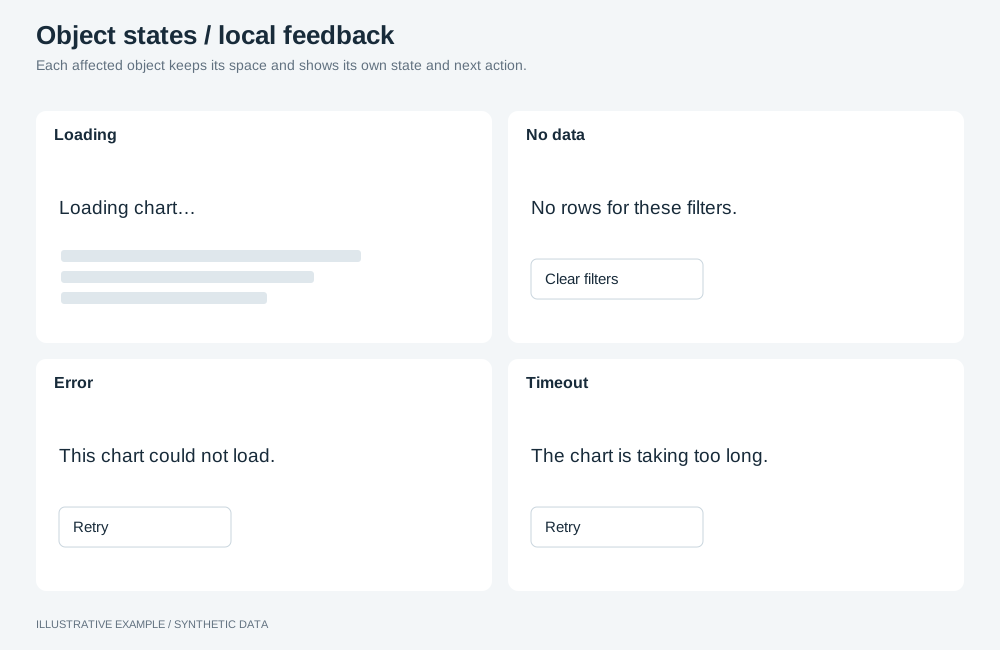
Illustrative example with synthetic data. Each affected object keeps its space and shows its own state and next action.
When to use object states
Section titled “When to use object states”Give a state to every object that queries: mounted objects and the figures you draw from your own queries.
| The page needs | Use |
|---|---|
| A placeholder before the runtime is ready | The boot loader |
| One message for a cause shared by every object | Page states |
Choose a state
Section titled “Choose a state”| State | Shown when | Message | Action |
|---|---|---|---|
| Loading | From mount, or from sending your query, until a result | The loading placeholder | None |
| Ready | handle.ready resolves rendered; your query returns rows |
The object | None |
| No data | Your query returns no rows | “No data for the current filters.” | Clear filters, when selections are applied |
| Error | handle.ready resolves error; your query rejects; a field is missing; its definition is refused |
“This chart could not be loaded.” | Retry, except for a missing field or a refused definition |
| Timeout | handle.ready resolves timeout while the page is visible |
“Still loading.” in a strip along the bottom of the host | Retry |
- Word no data and error differently. No data means the query ran; changing the filters can help.
- Show a timeout as a strip, not a cover: the chart stays mounted and can still render, and the strip stays until the reader chooses Retry, because no later render is reported.
- Ignore
unmounted. - Show a missing field or a refused definition as an error without Retry: retrying sends the same configuration again. Do not suggest changing filters for it. An operation refused while you prepare an object is not an error state: mount what was accepted and log the refusal. See Check operation results.
Markup
Section titled “Markup”<figure class="chart" data-object-id="revenue-by-week" data-state="loading" aria-busy="true"> <figcaption> <h2 class="chart-title">Revenue by week</h2> <p class="chart-subtitle">USD, all regions</p> </figcaption> <button class="chart-menu" type="button" aria-haspopup="dialog" aria-label="Options for Revenue by week"> <!-- icon --> </button> <div class="chart-host"></div> <div class="chart-state"> <p class="chart-state__message"></p> <button class="chart-state__action" type="button" hidden></button> </div></figure>data-stateon the card drives the CSS.- Set
aria-busy="true"while loading. - Do not make the message a live region; many objects failing together would announce many times. Announce a page-level summary with a toast instead.
.chart-state { /* The host's cell; see /app-components/object-frame/#css */ grid-area: 3 / 1 / 4 / -1; z-index: 1; display: none; place-content: center; justify-items: center; gap: 8px; padding: 12px; background: var(--surface); color: var(--muted); text-align: center;}.chart:is([data-state='loading'], [data-state='empty'], [data-state='error']) > .chart-state { display: grid;}/* A strip, so a chart that renders after its deadline stays visible. */.chart[data-state='timeout'] > .chart-state { display: flex; align-self: end; align-items: center; justify-content: space-between; padding: 4px 8px;}.chart-state__message { margin: 0;}- The layer shares the host’s grid cell, so the host keeps its size in every state. Do not hide the
host with
display: none; see Give every host a definite box. - An author
displayrule on the action overrides itshiddenattribute; qualify such a rule with:not([hidden]).
Behaviour
Section titled “Behaviour”Set the state
Section titled “Set the state”type ObjectState = 'loading' | 'ready' | 'empty' | 'error' | 'timeout';
const setState = (card: HTMLElement, state: ObjectState, message = '', action?: 'clear' | 'retry') => { card.dataset.state = state; card.setAttribute('aria-busy', String(state === 'loading')); const text = card.querySelector('.chart-state__message'); const button = card.querySelector<HTMLButtonElement>('.chart-state__action'); if (text) text.textContent = message; if (button) { // Hiding a focused button would drop focus to the page; move it to the card's menu first. if (action === undefined && button === document.activeElement) { card.querySelector<HTMLButtonElement>('.chart-menu')?.focus(); } button.hidden = action === undefined; button.dataset.action = action ?? ''; button.textContent = action === 'clear' ? 'Clear filters' : action === 'retry' ? 'Retry' : ''; }};Mounted objects. Handle handle.ready as Readiness shows and map the
result with the table above. Ignore a result from a mount that a later mount has replaced.
Retry unmounts and mounts the object again through its lifecycle chain, which costs one query.
Background tabs. If timeout resolves while document.hidden is true, keep the loading state
and mount the object again on visibilitychange. handle.ready does not report a later render; see
Readiness.
Your own queries. Re-query on applied changes and ignore superseded results, as Re-query your own objects only on applied changes shows. Show no data when the rows are empty and error when the query rejects. Log the query with the error; see Reading the answer.
Clear filters clears the whole selection group, not only this object’s filters, including a period applied as a selection; see Periods and date ranges. Wire both actions once for the document:
declare const selections: { clearAllSelections(group: string): void };declare const GROUP: string;declare function retry(id: string): void;
document.addEventListener('click', (event) => {  if (!(event.target instanceof Element)) return;  const button = event.target.closest<HTMLButtonElement>('.chart-state__action');  const id = button?.closest<HTMLElement>('[data-object-id]')?.dataset.objectId;  if (!button || id === undefined) return;  if (button.dataset.action === 'clear') selections.clearAllSelections(GROUP);  if (button.dataset.action === 'retry') retry(id);});
Focus. When the action the reader used is hidden, for example Retry becoming loading, move focus to the card’s menu button.
Queries
Section titled “Queries”| Action | Cost |
|---|---|
| Show or hide a state | None |
| Retry | One query for that object |
| Clear filters | One query per mounted object in the group, and one per figure you re-query |
Not available
Section titled “Not available”- A mounted object cannot report that it returned no rows, so the no-data state applies only to your own queries.
- For the timeout and cancellation limits of your own queries, see Data and objects.