Browser Page Freezes: Causes and Prevention
This page describes the classic Workbook Editor.
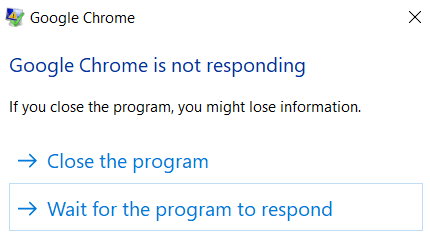
The Issue
Section titled “The Issue”When a workbook asks the browser to do more work at once than it can handle, the page freezes and the browser reports that it is not responding. In Chrome on Windows this is a dialog offering Close the program or Wait for the program to respond.
Possible Root Causes
Section titled “Possible Root Causes”Several factors contribute, often together:
-
Too many or too heavy objects on a sheet: many charts, tables, buttons and other objects, or a data-intensive chart, such as a scatter chart drawing 10,000 points.
-
Simultaneous event execution: many actions or data queries firing at the same time.
Best Practices
Section titled “Best Practices”Test throughout development so that you find performance problems before you publish.
-
Build incrementally and check performance at each stage, so that you can tell which change introduced a slowdown.
-
Create a workbook version when you add new items, so that you can roll back if performance drops. See Workbook Life-Cycle: Versioning.
-
Turn on action logging and watch the browser console while you use the workbook. The log shows which block fired each action and in what order, and errors from failing actions appear in the same console. See Debugging Actions in Astrato.
Areas to Consider
Section titled “Areas to Consider”-
Variables: update several variables in one Batch set variables block rather than with a separate Set variable block for each. Separate Set variable blocks update their variables one after another, each as its own update, which adds up to a visible delay when an action changes many variables, especially when a variable change triggers it; the batch block applies all the updates in a single step. It evaluates all its rows first and then applies the updates together, so a row cannot read a value written by an earlier row in the same block.
-
Loops: the For each block processes the items of a list one after another, running its Do blocks for one item before it moves to the next. Use it to work through a collection sequentially instead of firing many actions at once.
For an overview of action blocks, see Astrato Action Blocks.