

Metric switcher
A metric switcher is a set of toggle buttons, one per measure, that changes which measure one or more charts show: revenue, orders or margin over the same breakdowns. It sits above the charts, in the title row of the one card it drives, or it is the KPI row itself, with each KPI card as a button.
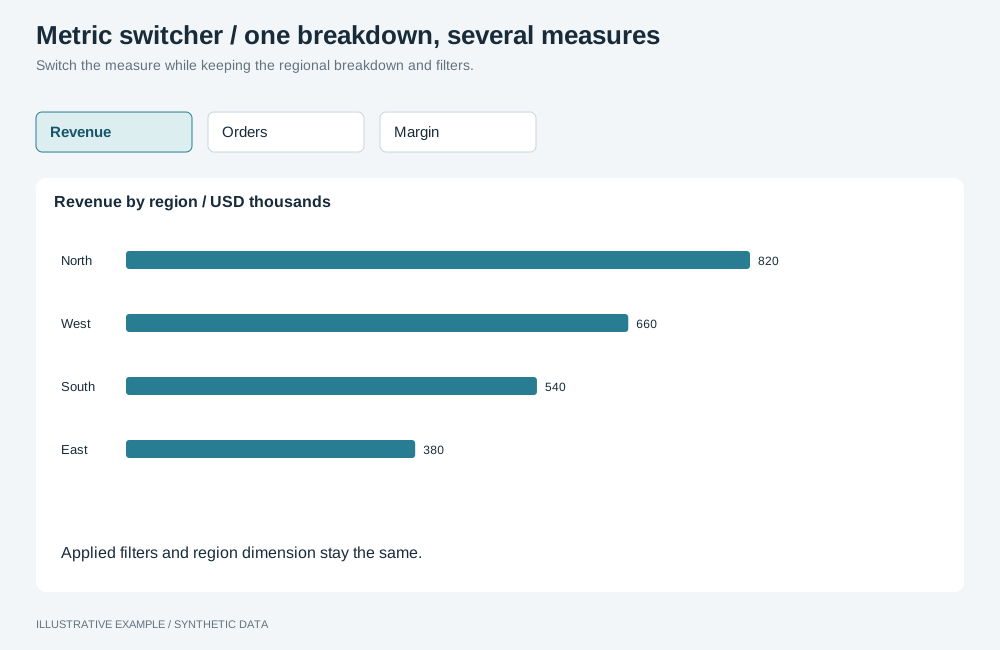
Illustrative example with synthetic data. Switch the measure while keeping the regional breakdown and filters.
Choose a variant
Section titled “Choose a variant”Use a metric switcher when readers look at one measure at a time through the same charts. For different charts per view, use tabs; for measures side by side, show them all.
- Does each measure have a headline number? Use selectable KPI cards.
- Does the switch drive one chart only? Use the in-card switcher.
- Otherwise, use the switcher bar.
| Variant | Where | Use cases | Choose another when |
|---|---|---|---|
| Selectable KPI cards | The KPI row | Calls, wait time and abandonment, the pressed one shown by team and hour | The measures have no single headline value |
| Switcher bar | A 36px band above the board | Sales by region and week, switched between revenue, orders and margin | The options do not fit on one row at the narrowest width; use a <select> |
| In-card switcher | The card’s title row | Units or value on one chart | The switch should drive other charts too |
Use toggle buttons, not radios: arrow keys in a radio group select as they move, and every selection re-queries the charts.
Markup
Section titled “Markup”<!-- Switcher bar --><div class="switcher-bar"> <div class="metric-switcher" role="group" aria-label="Measure shown in the charts"> <button type="button" aria-pressed="true" data-measure="revenue">Revenue</button> <button type="button" aria-pressed="false" data-measure="orders">Orders</button> <button type="button" aria-pressed="false" data-measure="margin">Margin</button> </div></div>
<!-- In-card switcher, in the card's title row beside the menu trigger --><figure class="chart" data-object-id="sales-by-region"> <figcaption> <h2 class="chart-title">Sales by region</h2> <p class="chart-subtitle">Units, last 12 months</p> </figcaption> <div class="chart-actions"> <div class="metric-switcher" role="group" aria-label="Measure for Sales by region"> <button type="button" aria-pressed="true" data-measure="units">Units</button> <button type="button" aria-pressed="false" data-measure="value">Value</button> </div> <button class="chart-menu" type="button" aria-haspopup="dialog" aria-label="Options for Sales by region"></button> </div> <!-- one host per measure --> <div class="chart-host" data-measure="units"></div> <div class="chart-host" data-measure="value" hidden></div></figure>For selectable KPI cards, put data-switcher on the KPI group so the same listener serves it.
The switcher reads --surface, --line, --ink, --muted, --accent and --radius from the style.
:root {  --switcher-h: 36px;}
/* Add this band to --above-board; see Bands above the board. */.switcher-bar {  height: var(--switcher-h);  margin-bottom: var(--gap);}
.metric-switcher {  display: inline-flex;  max-width: 100%;  height: var(--switcher-h);  box-sizing: border-box;  overflow: hidden;  border: 1px solid var(--line);  border-radius: var(--radius);}.metric-switcher > button {  flex: none;  padding: 0 12px;  border: 0;  background: var(--surface);  color: var(--muted);  font: inherit;  white-space: nowrap;}.metric-switcher > button + button {  border-inline-start: 1px solid var(--line);}.metric-switcher > [aria-pressed='true'] {  color: var(--ink);  font-weight: 600;  box-shadow: inset 0 -3px 0 var(--accent);}.metric-switcher > button:focus-visible {  outline: 2px solid var(--accent);  outline-offset: -2px;}
/* In a card's title row: the switcher and the menu trigger share the right column. */.chart-actions { grid-area: 1 / 2 / 3 / 3; display: flex; align-items: center; gap: 4px;}.chart-actions > .metric-switcher { --switcher-h: 28px;}.chart-actions > .metric-switcher > button { padding: 0 8px;}/* One host per measure; only the pressed one shows. */.chart-host[hidden] { display: none;}- The pressed option has a weight and a bar, so the state does not rest on colour.
- The bar adds
--switcher-h + --gapto--above-boardand to every height threshold: a threshold of 728px becomes 64 + 36 + 16 + 2 × 16 + 96 + 2 × 16 + 2 × 252 = 780.
Switch the measure
Section titled “Switch the measure”Create one instance per chart and measure, and mount only the pressed measure’s instance, with the
Panel lifecycle from Hidden means unmounted. Each instance
is compiled from its own definition, so it carries its own settings and needs no data item keys.
Give each instance its own host in the card, so a mount and an unmount never share a container.
// Panel is the lifecycle class from Hidden means unmounted; one per instance, keyed by measure.declare const charts: readonly {  card: HTMLElement;  instances: ReadonlyMap<string, { instanceId: string; panel: Panel; host: HTMLElement }>;}[];declare function setTitles(measure: string): void;
let current: string | undefined;const switchers = [...document.querySelectorAll<HTMLElement>('.metric-switcher, [data-switcher]')];
const selectMeasure = (measure: string) => {  if (measure === current || charts.some(({ instances }) => !instances.has(measure))) return;  current = measure;  for (const group of switchers) {    for (const button of group.querySelectorAll<HTMLButtonElement>('button[data-measure]')) {      button.setAttribute('aria-pressed', String(button.dataset.measure === measure));    }  }  setTitles(measure);  for (const { card, instances } of charts) {    for (const [id, { instanceId, panel, host }] of instances) {      const pressed = id === measure;      host.hidden = !pressed; // unhidden before mounting, so the host has a size      if (pressed) {        card.dataset.objectId = instanceId;        panel.show(host);      } else panel.hide();    }  }};
for (const group of switchers) {  group.addEventListener('click', (event) => {    if (!(event.target instanceof Element)) return;    const measure = event.target.closest<HTMLButtonElement>('button[data-measure]')?.dataset.measure;    if (measure !== undefined) selectMeasure(measure);  });}
// Mount the measure the markup starts with.const initial = switchers[0]?.querySelector<HTMLButtonElement>('button[data-measure][aria-pressed="true"]')?.dataset .measure;if (initial !== undefined) selectMeasure(initial);- Register each instance in the object menu’s
specsByIdmap under itsinstanceId. The card’sdata-object-idfollows the pressed measure, so menu actions use the visible instance’s spec. - Each
Panelserializes its own mount and unmount, so fast switching settles on the last pressed measure. - Update the card’s title and subtitle in the same handler; name the measure rather than stating a finding that is true for only one.
- A switch costs one query per chart shown. KPI cards do not re-query; their values do not depend on the pressed measure.
- The pressed measure is app state, not a selection: filters and Clear all leave it unchanged. Keep every instance in the page’s one selection group; see Use one selection group.