Written for: For administrators
Managing Users and Groups with Astrato API
A typical flow signs the user in, looks up their user ID and the group ID, and then adds the user to the group:
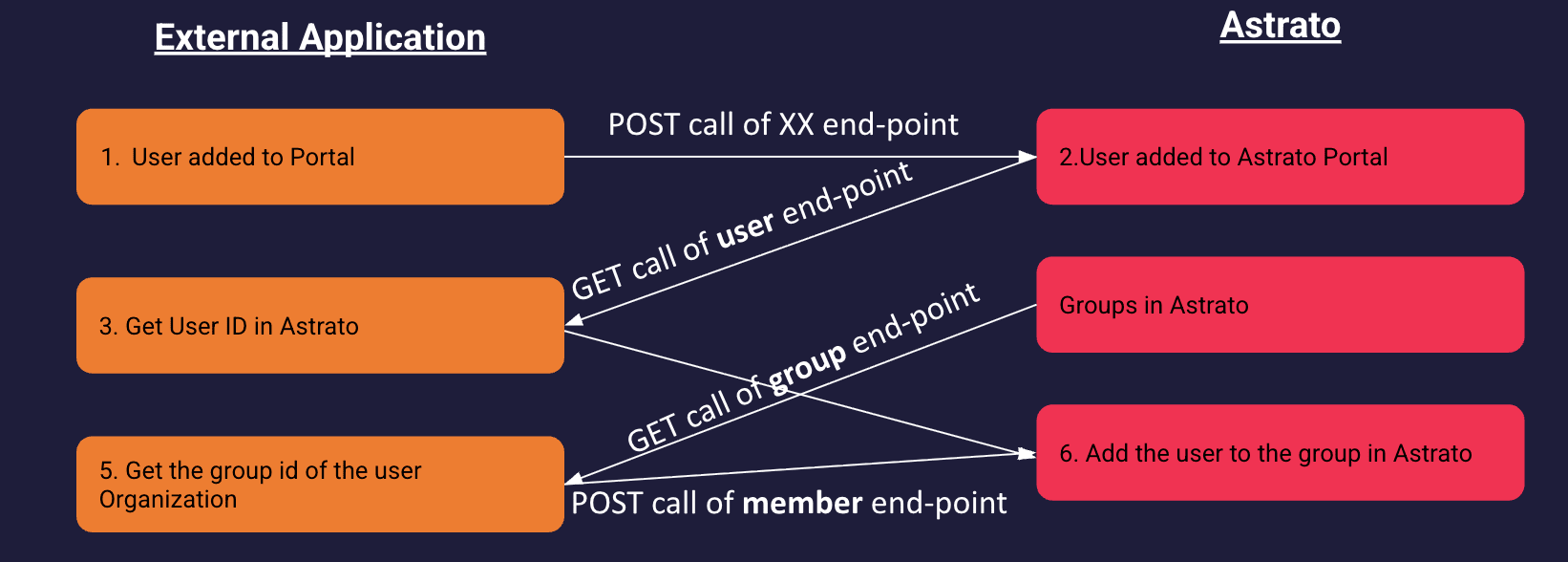
Prerequisites
Section titled “Prerequisites”- A personal access token, sent as
Authorization: Bearer <token>. An administrator allows tokens in System settings, and you create one as described in Authentication. Requests run with the permissions of the account that owns the token. - Your tenant ID, used in every path below. Ask your Astrato administrator if you do not know it.
- The right role. Viewers are refused with
403on every request here. Creators can list users and groups; creating a group or adding members needs an owner or administrator, as in Administration → Groups.
All paths below are relative to https://app.astrato.io/api/message. Send JSON bodies with
Content-Type: application/json.
| Method | Path | What it does |
|---|---|---|
GET |
/tenant/{tenantId}/user |
Lists users |
GET |
/tenant/{tenantId}/group |
Lists groups |
POST |
/tenant/{tenantId}/group |
Creates a group |
PATCH |
/tenant/{tenantId}/group/{groupId} |
Changes a group’s name or description |
DELETE |
/tenant/{tenantId}/group/{groupId} |
Deletes a group |
GET |
/tenant/{tenantId}/group/{groupId}/members |
Lists a group’s members |
POST |
/tenant/{tenantId}/group/{groupId}/members |
Adds members |
DELETE |
/tenant/{tenantId}/group/{groupId}/members/{memberId} |
Removes one member |
The list requests page their results: offset (default 0) and limit (default 50, at most
1000) are query parameters, and filter takes a URL-encoded JSON object. Each response carries
the number of matching records in a Pagination-Total header; raise offset by limit until you
have them all.
Create a user in Astrato using Web Ticketing
Section titled “Create a user in Astrato using Web Ticketing”Users of an embedded product are created through web tickets. Your backend asks for a ticket by email address, and names the groups whose permissions the user should have. Asking for the ticket does not create the user. Astrato creates them when their browser redeems the ticket, so look up their ID only after that. See Sign your own users in for the flow.
Get Tenant Users
Section titled “Get Tenant Users”GET /tenant/{tenantId}/user returns the users in the tenant. To find one person, pass
filter={"search":"dana"}, which matches the name or email address, ignoring case.
GET https://app.astrato.io/api/message/tenant/00000000-0000-0000-0000-000000000001/user?filter=%7B%22search%22%3A%22dana%22%7DAuthorization: Bearer <token>Each user in the response looks like this:
{ "id": "00000000-0000-0000-0000-0000000000a1", "email": "dana.diaz@example.com", "name": "Dana Diaz", "firstName": "Dana", "lastName": "Diaz", "imageUrl": null, "created": "2024-09-13T16:22:15.331Z", "updated": "2024-09-16T13:49:16.524Z", "isPending": false, "active": true, "teamId": "00000000-0000-0000-0000-0000000000b1", "role": "creator", "licenseType": "consumption", "creationOrigin": "internal", "is2FAEnabled": false, "twoFASetupDueDate": null}Use id as the resourceId when you add the user to a group.
Get Tenant Groups
Section titled “Get Tenant Groups”GET /tenant/{tenantId}/group returns the groups in the tenant. To find a group by name, pass
filter={"displayName":"sales"}, which matches names containing the text, ignoring case. To fetch
known groups, pass their IDs comma-separated in ids. Add embed=memberIds to include each
group’s member resource IDs.
{ "id": "00000000-0000-0000-0000-0000000000c1", "displayName": "Sales", "description": null, "created": "2024-09-16T08:23:00.162Z", "updated": "2024-09-16T08:23:00.162Z", "creationOrigin": "internal", "externalId": null, "membersQuantity": 2}Create a New Group
Section titled “Create a New Group”POST /tenant/{tenantId}/group creates a group and returns it. displayName is required and must
be 2 to 200 characters after trimming; description is optional, up to 1,024 characters.
POST https://app.astrato.io/api/message/tenant/00000000-0000-0000-0000-000000000001/groupAuthorization: Bearer <token>Content-Type: application/json
{ "displayName": "Sales", "description": "Created from our product backend" }
PATCH /tenant/{tenantId}/group/{groupId} takes the same displayName and description fields,
each optional, with the same limits.
Add a User to a Group
Section titled “Add a User to a Group”POST /tenant/{tenantId}/group/{groupId}/members adds one or more members. members must hold at
least one entry. resourceType is user for an account, or invite for a pending invitation, and
resourceId is that account’s or invitation’s ID.
POST https://app.astrato.io/api/message/tenant/00000000-0000-0000-0000-000000000001/group/00000000-0000-0000-0000-0000000000c1/membersAuthorization: Bearer <token>Content-Type: application/json
{ "members": [{ "resourceId": "00000000-0000-0000-0000-0000000000a1", "resourceType": "user" }] }
The response lists the new memberships:
[ { "id": "00000000-0000-0000-0000-0000000000d1", "email": "dana.diaz@example.com", "name": "Dana Diaz", "resourceId": "00000000-0000-0000-0000-0000000000a1", "resourceType": "user", "tenantGroupId": "00000000-0000-0000-0000-0000000000c1", "imageUrl": null, "created": "2024-09-16T14:16:19.069Z", "creationOrigin": "internal" }]To remove a member later, send DELETE to /tenant/{tenantId}/group/{groupId}/members/{memberId},
where memberId is the membership id from this response or from the member list, not the user
ID. What a group then grants is set on the resources themselves; see
How access works.