

Chart switcher
A chart switcher is a small group of buttons in a card’s title row that shows the same data in another form: bars, a line or a table. The data, filters and title stay. It sits beside the card’s menu in the card.
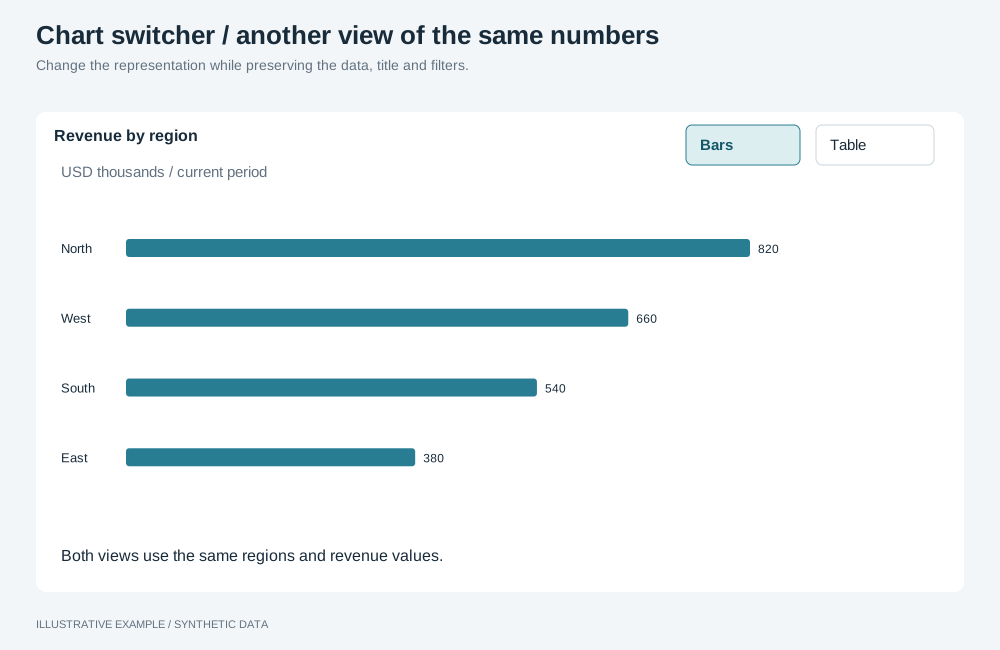
Illustrative example with synthetic data. Change the representation while preserving the data, title and filters.
Choose a variant
Section titled “Choose a variant”Use it when readers need the same numbers in two or three forms, such as a trend as a line and as a table. For a different measure use the metric switcher; for different content per option use tabs; for the next level of detail use drill-down.
- Do the options stay within one type: line or area, vertical or horizontal bars, grouped or stacked bars? Use one object.
- Otherwise, use one object per type.
| Variant | Switches with | Use cases | Choose another when |
|---|---|---|---|
| One object per type | One instance per type; only the shown one mounted | Revenue by month as bars, a line or a table | The options are settings of one type |
| One object | An operation on the mounted instance | Revenue by month as a line or an area | The options need different types |
Markup
Section titled “Markup”<figure class="chart" data-object-id="revenue-by-month"> <figcaption> <h2 class="chart-title">Revenue by month</h2> <p class="chart-subtitle">USD, all regions</p> </figcaption> <div class="chart-tools"> <div class="chart-switch" role="group" aria-label="Show revenue by month as"> <button type="button" aria-pressed="true" data-view="bar"> <svg aria-hidden="true" viewBox="0 0 16 16" width="16" height="16"></svg> <span class="visually-hidden">Bar chart</span> </button> <button type="button" aria-pressed="false" data-view="line"> <svg aria-hidden="true" viewBox="0 0 16 16" width="16" height="16"></svg> <span class="visually-hidden">Line chart</span> </button> <button type="button" aria-pressed="false" data-view="table"> <svg aria-hidden="true" viewBox="0 0 16 16" width="16" height="16"></svg> <span class="visually-hidden">Table</span> </button> </div> <button class="chart-menu" type="button" aria-haspopup="dialog" aria-label="Options for Revenue by month"></button> </div> <!-- One object per type: one host per view --> <div class="chart-host" data-view="bar"></div> <div class="chart-host" data-view="line" hidden></div> <div class="chart-host" data-view="table" hidden></div></figure>Use toggle buttons, not radios, so arrow keys do not mount an object on every press. Name the group
after the card. .chart-tools is defined in Drill-down and
.visually-hidden in Quick filters.
The switcher reads --line, --surface, --ink and --radius from the style. Add these rules
after the card CSS.
/* 3 × 28 + 2 × 1 = 86px wide and 30px tall, inside the 38px title and subtitle rows. */.chart-switch { display: flex; border: 1px solid var(--line); border-radius: var(--radius); overflow: hidden;}.chart-switch > button { display: inline-grid; place-items: center; width: 28px; height: 28px; padding: 0; border: 0; background: var(--surface); color: var(--ink);}.chart-switch > button + button { border-inline-start: 1px solid var(--line);}.chart-switch > button[aria-pressed='true'] { background: var(--ink); color: var(--surface);}/* overflow: hidden clips an outside ring, so draw it inside. */.chart-switch > button:focus-visible { outline: 2px solid var(--ink); outline-offset: -2px;}.chart-host[hidden] { display: none;}The host’s size comes from the card’s grid row, so a long table does not grow the card; see A panel’s height must not follow its data.
Switch between types
Section titled “Switch between types”Create one instance per type, each compiled from its own definition with its own id and the same
fields and group; see Instance identity. Mount only the shown one,
each through its own Panel from Hidden means unmounted.
// Panel is the lifecycle class from Hidden means unmounted; one per view.declare const views: ReadonlyMap<string, { instanceId: string; panel: Panel; host: HTMLElement }>; // 'bar', 'line', 'table'declare const group: HTMLElement; // .chart-switch
const card = group.closest<HTMLElement>('.chart');if (!card) throw new Error('Chart card not found.');const buttons = [...group.querySelectorAll<HTMLButtonElement>('button[data-view]')];
const show = (next: string) => {  const active = views.get(next);  if (!active) return;  card.dataset.objectId = active.instanceId;  for (const button of buttons) button.setAttribute('aria-pressed', String(button.dataset.view === next));  for (const [id, { panel, host }] of views) {    host.hidden = id !== next; // unhidden before mounting, so the host has a size    if (id === next) panel.show(host);    else panel.hide();  }};
group.addEventListener('click', (event) => {  if (!(event.target instanceof Element)) return;  const view = event.target.closest<HTMLButtonElement>('button[data-view]')?.dataset.view;  if (view !== undefined) show(view);});
show('bar');- Register each instance in the object menu’s
specsByIdmap under itsinstanceId. Keepdata-object-idon the card and update it with the visible instance, so both the menu button and right-click resolve that instance’s spec for data and exports. - Each switch costs one query for the object shown, including a switch back.
- Show object states over the host until the object is ready.
- No operation changes a mounted chart’s type; see App limitations.
Switch within one type
Section titled “Switch within one type”Change the setting with an operation on the mounted instance, and
check the result. Set aria-pressed from the request and set
it back if the operation fails.
| Options | Operation | Payload |
|---|---|---|
| Line, area, stacked area | setLineChartType |
'line', 'area' or 'stacked' |
| Vertical or horizontal bars | setBarChartOrientation |
'vertical' or 'horizontal' |
| Grouped or stacked bars | setBarChartLayout |
'groups' or 'stacked'; both need more than one dimension or measure |
// Call this from the control's handler.async function showAsArea(): Promise<void> { const result = await applyRuntimeOperations({ runtime, instanceId: 'revenue-by-month', availableFields, operationRequests: [{ id: 'type', name: 'setLineChartType', payload: 'area' }], }); // Check result.results; on a refusal, set aria-pressed back.}