

Auth: OEM API (Web Ticket Authentication)
Introduction
Section titled “Introduction”The OEM API enables setting an authentication flow for users who automatically access an Astrato tenant without a password. The flow is highlighted in the image below.
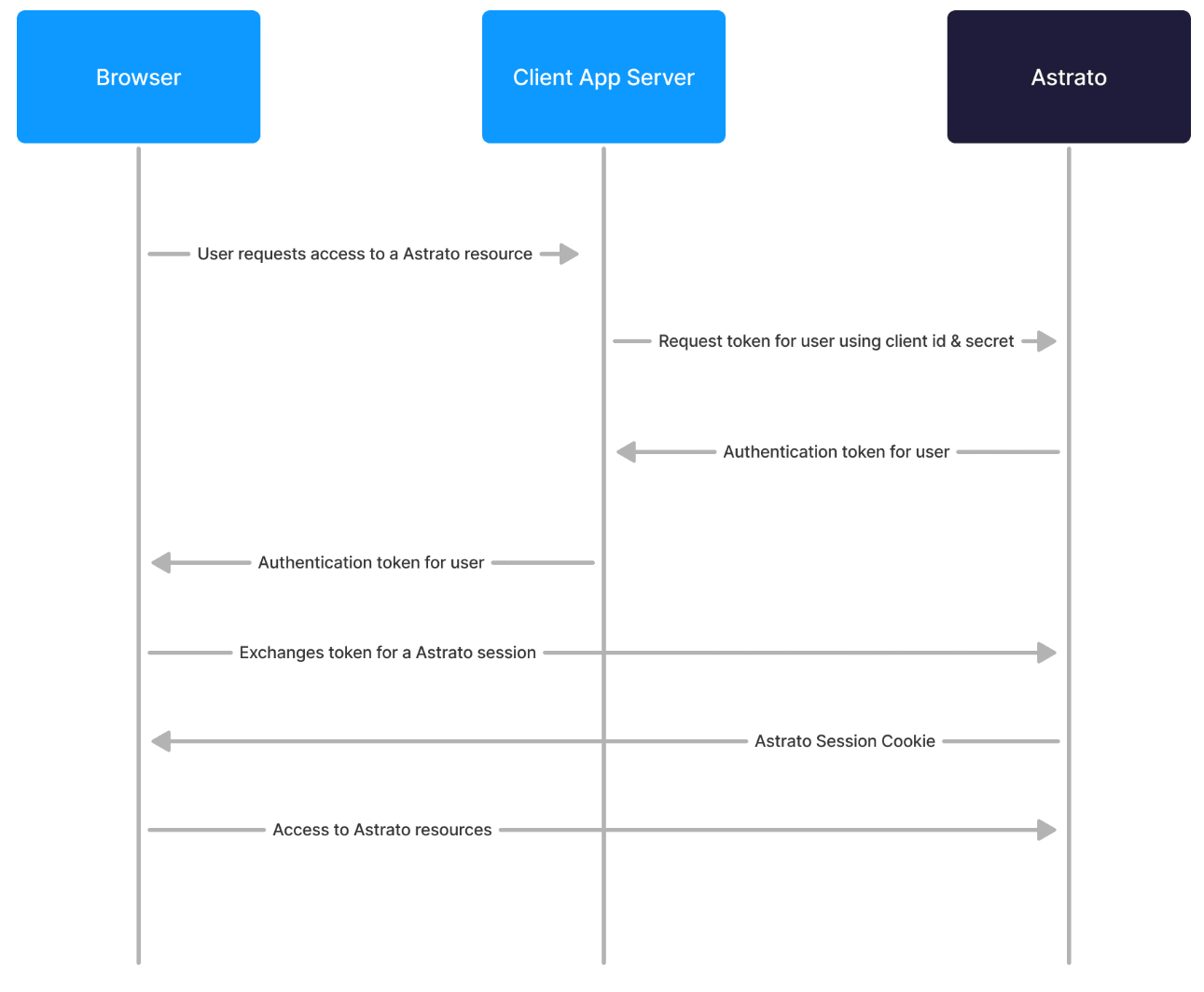
Example Environment
Section titled “Example Environment”The link below provides a detailed example of how to test and set an OEM authentication flow in Astrato.
https://github.com/astrato-io/astrato-oem-integration-example
Astrato Tenant Settings | Get Client ID & Secret
Section titled “Astrato Tenant Settings | Get Client ID & Secret”In the Astrato, tenants navigate to the Administration section.
In the Administration section, click on View System Settings, which is at the top section.
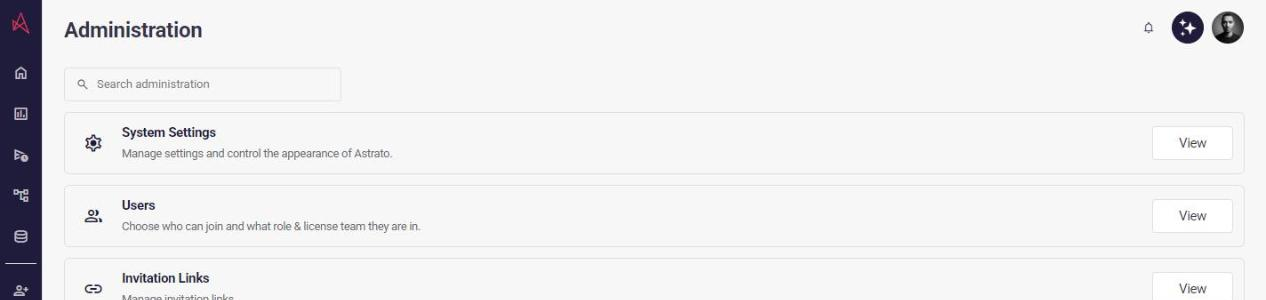
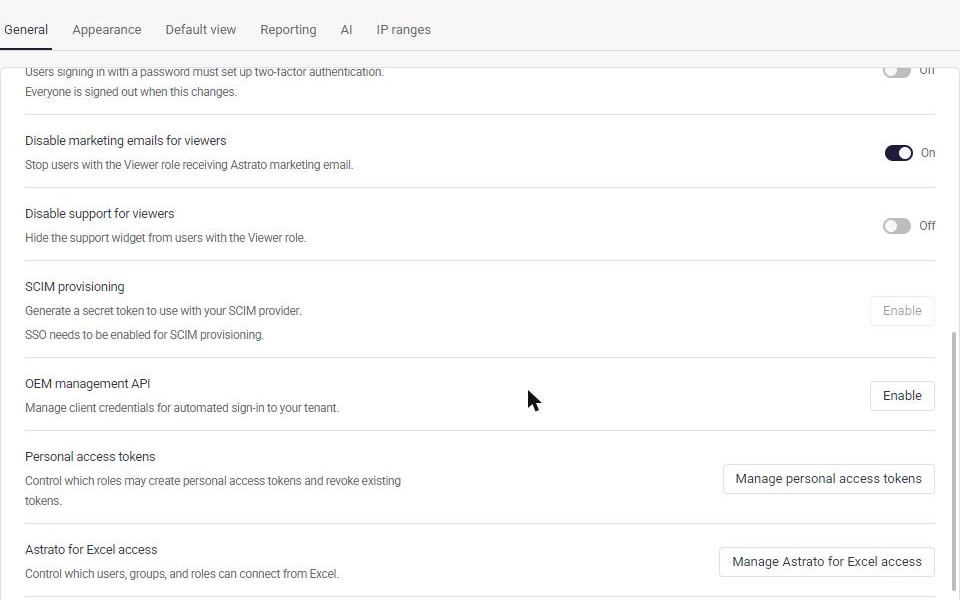
Look for the OEM Management API section in the System Settings section; if it’s the first time, click on Enable.
If it has already been enabled, click on View.
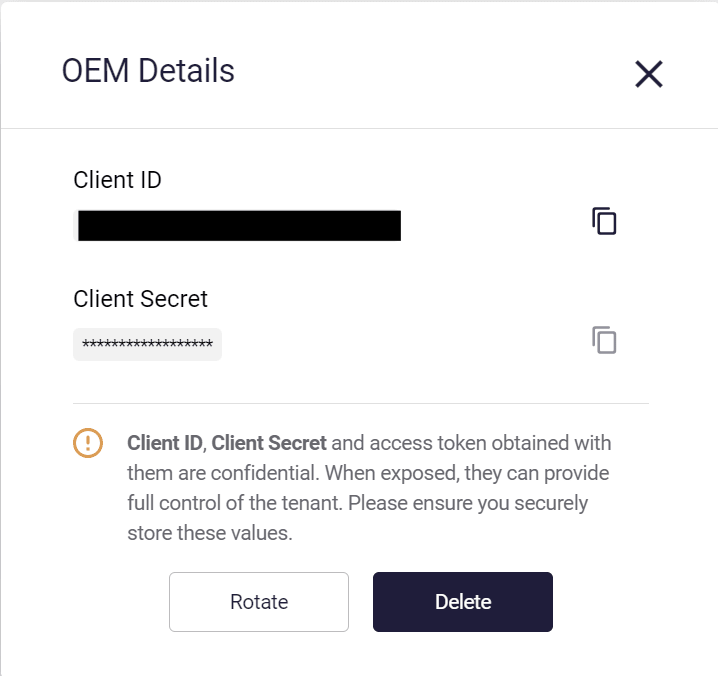
When you click on View, you’ll see the Client_ID and Client_Secret.
If a new set is needed, click on Rotate.
Copy them to set up your OEM API authentication flow.
Authentication Flow
Section titled “Authentication Flow”The flow is explained in a sequence of requests:
Requests to manage API tokens and session ticket endpoints should not be triggered publicly by the browser. Client ID, Client Secret, and an obtained astrato access token are confidential and, when exposed publicly, will lead to providing full control to the tenant to the world. For security reasons, request those endpoints from a backend service that only exposes a Ticket ID.
ℹ️ Expiry of tokens / sessions
Get oem token: valid for 10 minutes
Use oem token to create tickets: ticket is valid for 60 seconds
Use ticket to create session: session is valid for 7 days
- You can manually invalidate a session using this endpoint: https://app.astrato.io/auth/proxy/0/sign_out
Please note, expiry is not custom.
Steps:
Section titled “Steps:”-
POST
/auth/proxy/m2m/tokenAuthentication: public
To get a token, you must authenticate your next requests from Client App Service to the Astrato OEM API.
⚠️ Note: If the user email does not already exist in the system, a temporary user will be created.
This user will not have access permissions unless assigned to a group.
Make sure to include a group (viagroupIdsorgroupNames) that has the required permissions.
Request:
curl --location 'https://app.astrato.io/auth/proxy/m2m/token' \--header 'Content-Type: application/json' \--data '{ "clientId": "your client id", "clientSecret": "your client secret"}'For example, in PHP it can be used as
function getManagementApiToken() { $client = new Client(); $headers = ['Content-Type' => 'application/json']; $body = json_encode([ 'clientId' => $_ENV['ASTRATO_CLIENT_ID'], 'clientSecret' => $_ENV['ASTRATO_CLIENT_SECRET'] ]); $url = $_ENV['ASTRATO_URL'] . '/auth/proxy/m2m/token'; $request = new Request('POST', $url, $headers, $body); $res = $client->send($request); $result = json_decode($res->getBody(), true)['access_token']; return $result;}Response:
{ "access_token": "XXXXXXXXJSUzI1NiIsInR5cCI6IkpXVCJ9.eyJuYW1lIjoiT0...", "expires_in": 1699891513107} -
POST
/oem/setupAuthentication: m2m bearer token
Setup endpoint, which prepares a user session. If a user account doesn’t exist, it will be created in a tenant
Request using groupids:
curl --location 'https://app.astrato.io/oem/setup' \--header 'Content-Type: application/json' \--header 'Authorization: Bearer eyJhbGciOiJSUzI...' \--data-raw '{ "email": "XXXXXX@astrato.io", "name": "Developer Viewer", "groupIds": ["XXXXXX-07bb-429a-8795-5164fddc9e17","XXXXXX-2708-4444-8e71-a3cdfe6e24f8"]}'
Request using groupNames:
curl --location 'https://app.astrato.io/oem/setup' \--header 'Content-Type: application/json' \--header 'Authorization: Bearer eyJhbGciOiJSUzI...' \--data-raw '{ "email": "XXXXXX@astrato.io", "name": "OEM User", "groupNames": [ "OEM2" ]}'
An example in PHP:
function getSessionTicket($accessToken, $email, $groupIds = []) { $client = new Client(); $headers = [ 'Content-Type' => 'application/json', 'Authorization' => "Bearer $accessToken" ]; $body = json_encode([ 'email' => $email, 'groupIds' => $groupIds ]); $request = new Request('POST', $_ENV['ASTRATO_URL'] . '/oem/setup', $headers, $body); $res = $client->sendAsync($request)->wait(); $result = json_decode($res->getBody(), true); return $result['ticket'];}-
Email(required): if a user with such an email doesn’t exist, the account will be created
-
groupIds (optional): list of groups to temporarily assign users. Membership won’t make permanent changes to group membership or be visible on group management views.
Response:
{ "ticket": "XXXXXXX-b1cb-4a84-844e-8XXXXXXXX"} -
GET /auth/proxy/oem/ticket/:ticketId?embed
Authentication: public
It creates a user session cookie under the hood and redirects to Astrato UI. Due to cookie policy, this link cannot be used by embeds. To make it work with embeds, the browser needs to make a top-level request, and when it’s done, an embed with a proper link should be injected into the front end.
PHP Example:
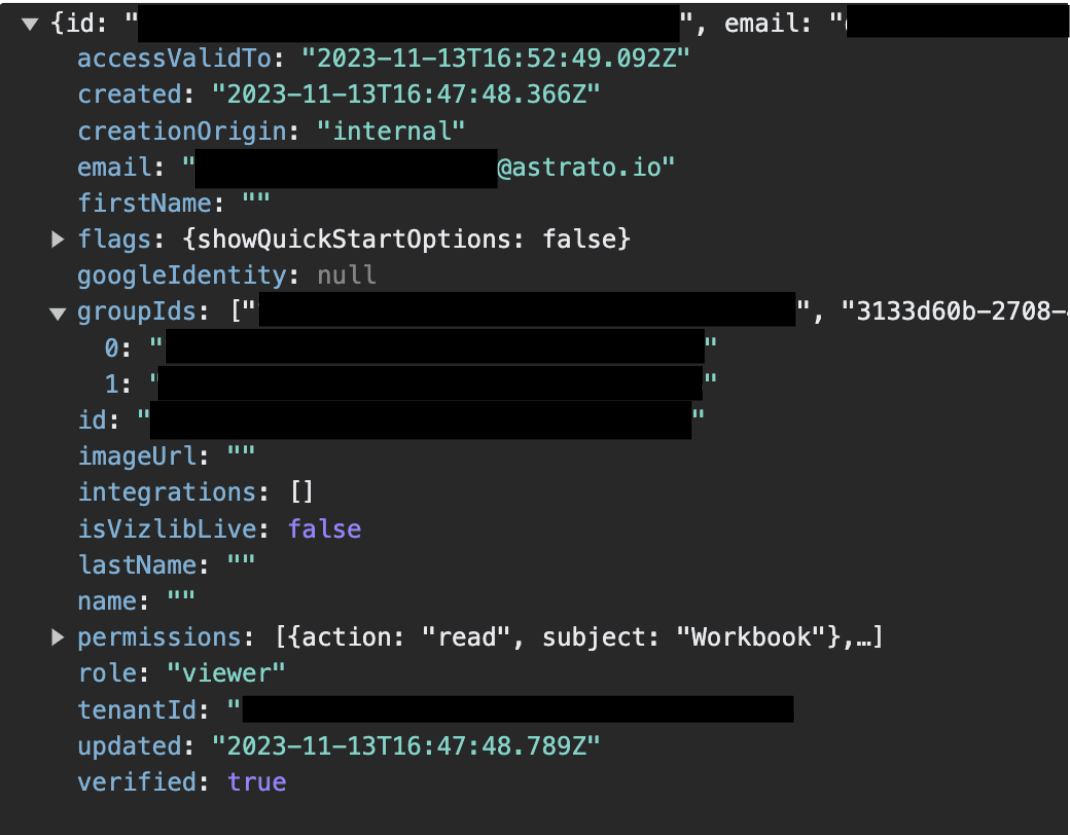
rxjs.fetch.fromFetch(`${ASTRATO_URL}auth/proxy/oem/ticket/${data.ticketId}?embed`, { credentials: 'include', selector: response => response.json() }The resolved user will be returned with groupIds that were requested on OEM/setup
Logout a user from Astrato
Section titled “Logout a user from Astrato”To logout a user, call this URL via API:
https://app.astrato.io/auth/proxy/0/sign_out
Dynamic filtering via browser event
Section titled “Dynamic filtering via browser event”This setup lets you pass any filter into Astrato using a single reusable action, as long as the payload includes:
-
qualified field name
-
filter value
Payload format
<qualified field name>|<filter value>;Multiple filters:
Product Dim.Hierarchy Lvl2 Name|Fresh,Frozen;Product Dim.Hierarchy Lvl3 Name|Canned Foods,Desserts;How the action works
Section titled “How the action works”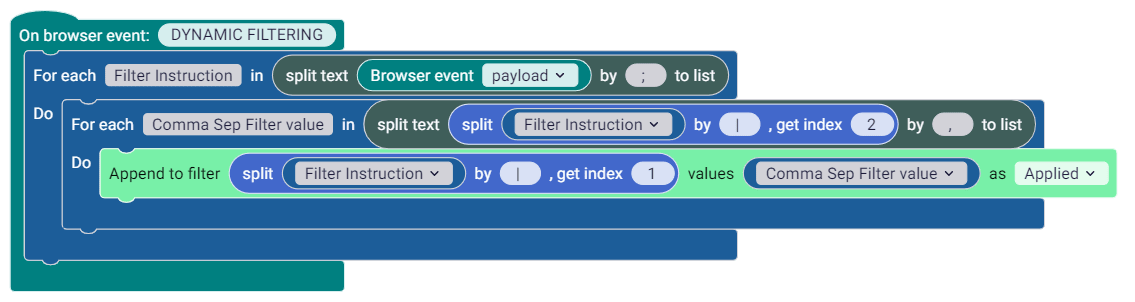
1. Listen to event
- On browser event:
DYNAMIC FILTERING2. Split into filter instructions
Split
Browser event payloadby;This creates a list of filter instructions
3. Loop through each instruction
For each
Filter Instruction:
Extract field name
split(Filter Instruction, "|")[1]Extract value
split(Filter Instruction, "|")[2]4. Apply filter dynamically
Set filter (Filter Field Name) to (Filter Field Value) as Applied
📋Copy action blocks | Paste directly into Actions workspaces
{"serializedActions":{"type":"on_custom_event","id":"}rZ)#TNOtP/kiW`Pu`g%","x":652,"y":562,"inputs":{"message_type":{"shadow":{"type":"custom_text","id":"/3vb%*+5#=77/?EFH2gh","fields":{"TEXT":"DYNAMIC FILTERING"}}},"DO":{"block":{"type":"loop_for_each","id":"/cKxoZ_|p-`$I*Mz-#Ul","fields":{"iterator":"Filter Instruction"},"inputs":{"list":{"block":{"type":"text_split_to_list","id":"m5My=XP]4.H4x^f#x;ED","inputs":{"text1":{"shadow":{"type":"custom_text","id":"n%;@an[wLKtf|9EG{bA`","fields":{"TEXT":""}},"block":{"type":"custom_event_data","id":"EdgDwh_$O#p#w-uTe4oH","fields":{"data_type":"payload"}}},"text2":{"shadow":{"type":"custom_text","id":"IYWcl!MA#Q~f#F5I9Ldy","fields":{"TEXT":";"}}}}}},"do":{"block":{"type":"loop_for_each","id":"D#Z_U./XdRVy?k.-1;n$","fields":{"iterator":"Comma Sep Filter value"},"inputs":{"list":{"block":{"type":"text_split_to_list","id":"[KwB:3$IMv(n.b0%rRG:","inputs":{"text1":{"shadow":{"type":"custom_text","id":"n%;@an[wLKtf|9EG{bA`","fields":{"TEXT":""}},"block":{"type":"text_split","id":"H[xFkj;i`=08t/KrG``o","inputs":{"text1":{"shadow":{"type":"custom_text","id":"^G~]cdAS|_0x[G0FO@W]","fields":{"TEXT":""}},"block":{"type":"iteratorValue","id":"`VU`960@Uu2ZvEQQB~jq","extraState":{"foreachBlockId":"/cKxoZ_|p-`$I*Mz-#Ul"},"fields":{"selected_iterator":"/cKxoZ_|p-`$I*Mz-#Ul"}}},"text2":{"shadow":{"type":"custom_text","id":"(*`_+Yz%_!*Yeg6M0uLG","fields":{"TEXT":"|"}}},"index":{"shadow":{"type":"custom_math_number","id":"i`~Dxn7s$nsamLQ3(rc*","fields":{"NUM":2}}}}}},"text2":{"shadow":{"type":"custom_text","id":"?nI;[sFfb~De:ZHA7($[","fields":{"TEXT":","}}}}}},"do":{"block":{"type":"set_filter_v1","id":"iURdL@(d|EVMql4^4MP:","fields":{"STATE":"APPLIED"},"inputs":{"FIELD":{"block":{"type":"text_split","id":"0Lxx/{b*R7{{_cCH`*]B","inputs":{"text1":{"shadow":{"type":"custom_text","id":"^G~]cdAS|_0x[G0FO@W]","fields":{"TEXT":""}},"block":{"type":"iteratorValue","id":"B3(xto*@ej8XHm}fgaf$","extraState":{"foreachBlockId":"/cKxoZ_|p-`$I*Mz-#Ul"},"fields":{"selected_iterator":"/cKxoZ_|p-`$I*Mz-#Ul"}}},"text2":{"shadow":{"type":"custom_text","id":"`#(O9[jxc839o1=Bo~Uy","fields":{"TEXT":"|"}}},"index":{"shadow":{"type":"custom_math_number","id":"/#Nl((NthhMJ(ong#^CG","fields":{"NUM":1}}}}}},"apply-filter-field":{"shadow":{"type":"multiselect_dropdown","id":"%U=4x?`$qF$m2i?%+1bu","fields":{"TEXT":[]}},"block":{"type":"iteratorValue","id":"E3K/rdfWZfHe*JF=tmWN","extraState":{"foreachBlockId":"/cKxoZ_|p-`$I*Mz-#Ul"},"fields":{"selected_iterator":"D#Z_U./XdRVy?k.-1;n$"}}}}}}}}}}}}}},"workspaceId":"-D0n@*aj9~7(}8znJ~Bh"}Example Payloads
Section titled “Example Payloads”Single Filter
Section titled “Single Filter”Payload
Product Dim.Hierarchy Lvl2 Name|Fresh;Result
-
Field:
Product Dim.Hierarchy Lvl2 Name -
Value:
Beauty -
Filter applied instantly
Multi-filter example
Section titled “Multi-filter example”Payload
Region Dim.Country Name|United Kingdom;Date Dim.Year|2026;Result
- Applies both filters in one event
Test browser trigger payload
Section titled “Test browser trigger payload”Test in iframe
const iframe = document.querySelector('iframe');function sentMessage(type, payload) { iframe.contentWindow.postMessage( { type: type, // or just `type` payload: payload // or just `payload` }, '*' );}sentMessage('DYNAMIC FILTERING', 'Product Dim.Hierarchy Lvl2 Name|Fresh,Grocery;');Test in embed link / preview mode
function sentMessage(type, payload) { postMessage( { type: type, // or just `type` payload: payload // or just `payload` }, '*' );}sentMessage('DYNAMIC FILTERING', 'Product Dim.Hierarchy Lvl2 Name|Fresh,Grocery;');Example of Row-Level Filters using the OEM API
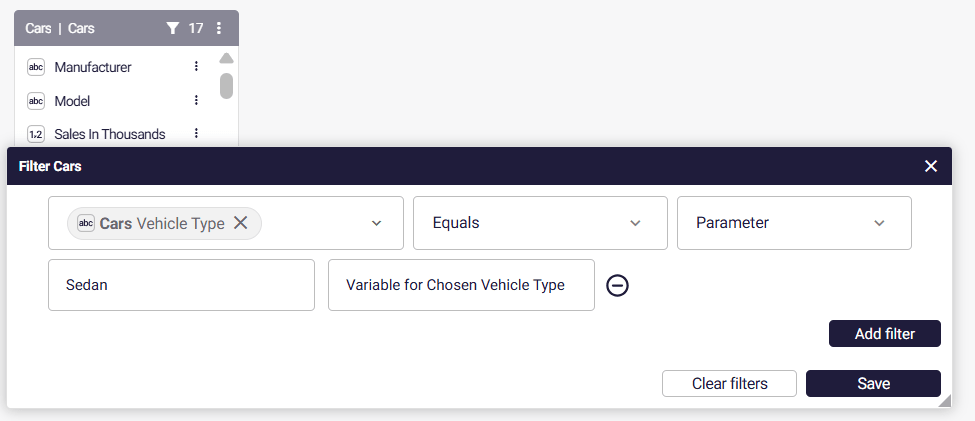
Section titled “Example of Row-Level Filters using the OEM API”To set up this feature, you first need to add a parameter as a filter in your semantic layer. This feature lets you filter datasets dynamically using parameters or variables instead of fixed values. Parameters act as placeholders that can be controlled by user input, actions, or pre-defined logic—making dashboards more interactive and adaptable to different user needs.
To try this out:
-
Open your semantic layer
-
Click on the menu of the table, to Edit/view the table
-
Click on the filter icon
-
When filtering, make sure to select the paramter option, where the default is “value”
curl --location 'https://app.astrato.io/oem/setup' \--header 'Content-Type: application/json' \--header 'Authorization: Bearer eyJhbGciOiJSUzI...' \--data-raw '{ "email": "XXXXXX@astrato.io", "name": "Developer Viewer", "filterParameters": { "[myData].[float]": 100.1, "[greeting].[string]": "Welcome", "[org_id].[string]": "ID8700089023" "[region].[undefined]": null }, "groupIds": [ "XXXXXX-07bb-429a-8795-5164fddc9e17", "XXXXXX-2708-4444-8e71-a3cdfe6e24f8" ]}'ℹ️
"[region].[undefined]": nullif using undefined, we remove filters. This may be used when starting a session for admins, or users that don’t require data reduction.
Example data types to use:
-
float
-
string
-
int
-
boolean
-
date
-
timestamp
Unbranded login page for OEM / customer-facing analytics
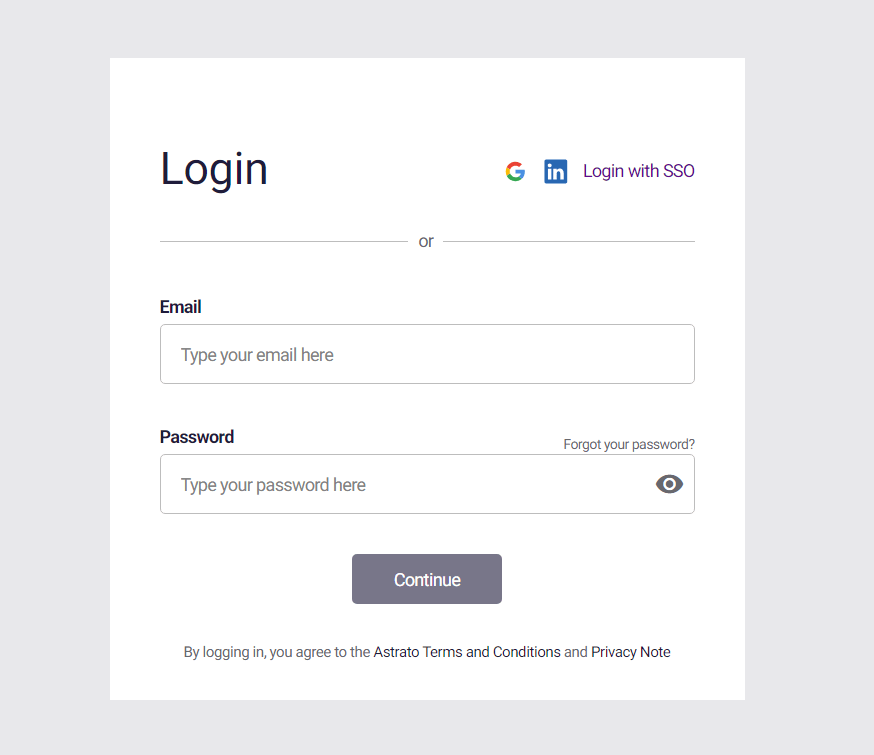
Section titled “Unbranded login page for OEM / customer-facing analytics”If you have customer facing analytics, you can use an unbranded login page for your customers. Simply have customers login using the link below, and they’ll return to this page automatically if they need to login again. Please not to access this page the URL parameter hideInfo=true is required.
https://app.astrato.io/auth-login/sign-in?hideInfo=true
Send an invite to your customers, with an unbranded invite link
Section titled “Send an invite to your customers, with an unbranded invite link”To generate an unbranded signup link, from an Astrato invite URL
-
Generate the invite link, from the left side of the Astrato lobby
-
Click the invite URL (in incognito mode, or when not logged in)
-
Copy the new redirected URL
-
Add in
hideInfo=true&directly after the?
