

Drill-Through dimension in the Workbook
Astrato Drill Through Dimension Overview
Section titled “Astrato Drill Through Dimension Overview”Astrato Drill-Through Dimension is an interactive tool that allows users to change the active dimension of the data visualizations in the workbook.
Drill-Through dimension allows users to answer the “next question” by easily changing the charts and tables display and helps them uncover insights in their analytics journey.
Drill-through dimension ensures the dashboard remains interactive even after users slice
and filter the data.
Drill-through dimension helps creators to build and maintain dashboards as they aren’t required to create multiple sets of charts showing the same KPIs with different dimensions.
This will speed up dashboard creation.
Adding A Drill-Through Dimension
Section titled “Adding A Drill-Through Dimension”ℹ 👩🎓 To learn more about creating drill-through dimensions, read this guide
-
Add a new chart or table, and select a drill-through dimension from the dimensions created in the data-view editor.
-
Add measures to the chart.
Using Drill-Through in a workbook
Section titled “Using Drill-Through in a workbook”Once a Drill-Through dimension is added to a chart, the Drill-Through dimension icon will become active, and the user will be able to change the active dimension for any Drill-Through dimension through the menu.
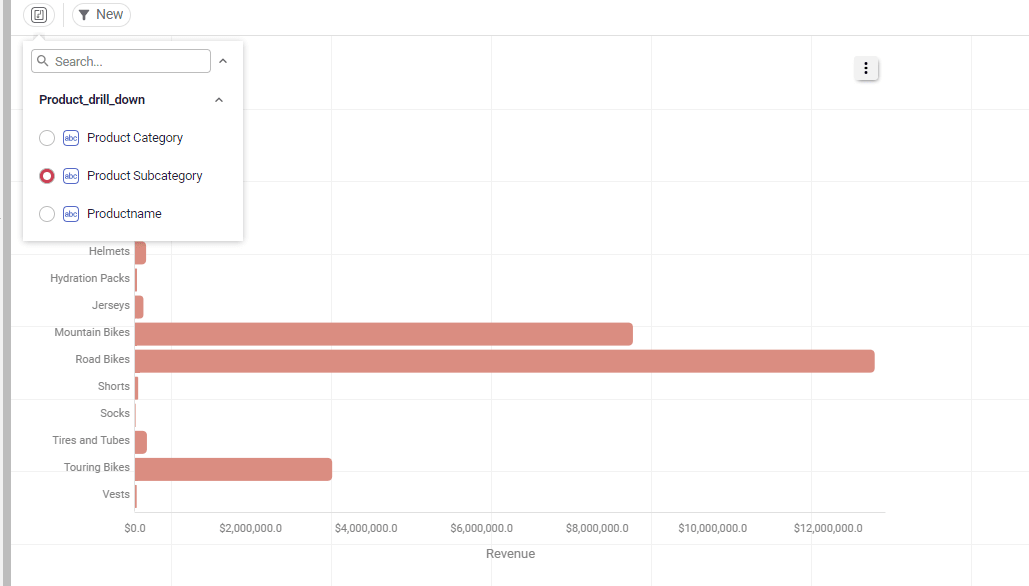
When a dimension title is shown, drill-through becomes automatically available on charts which use drill-through dimensions.