

Performance & Usage Telemetry: Store Astrato activity in ClickHouse
This approach creates a query history layer using ClickHouse’s system.query_log. It captures executed queries, performance metrics, and Astrato metadata (passed via log_comment) and makes them queryable for product analytics.
Unlike aggregate monitoring, this gives row-level visibility into:
-
which dashboards are used
-
which users are active
-
which objects are queried
-
how queries perform
How it works
Section titled “How it works”Astrato sends metadata with each query using:
SETTINGS log_comment = '{"type":"query",...}'ClickHouse stores this in:
system.query_log.log_commentThis JSON includes:
{ "type":"query", "userId":"...", "roleType":"owner", "objectId":"...", "sheetId":"...", "workbookId":"...", "workbookState":"draft"}ClickHouse already tracks:
-
execution time
-
rows read
-
bytes scanned
-
memory usage
-
query text
So combining both = full usage + performance telemetry.
Base query (raw telemetry)
Section titled “Base query (raw telemetry)”SELECT event_time, query_id, user, initial_user, log_comment, JSONExtractString(log_comment, 'type') AS meta_type, JSONExtractString(log_comment, 'userId') AS meta_user_id, JSONExtractString(log_comment, 'roleType') AS meta_role_type, JSONExtractString(log_comment, 'objectId') AS meta_object_id, JSONExtractString(log_comment, 'sheetId') AS meta_sheet_id, JSONExtractString(log_comment, 'workbookId') AS meta_workbook_id, JSONExtractString(log_comment, 'workbookState') AS meta_workbook_state, JSONExtract(log_comment, 'fields', 'Array(String)') AS meta_fields, JSONExtractRaw(log_comment, 'measures') AS meta_measures, query_duration_ms, read_rows, read_bytes, written_rows, written_bytes, result_rows, result_bytes, memory_usage, queryFROM system.query_logWHERE length(log_comment) > 20 AND user != 'monitoring-internal' AND initial_user NOT LIKE 'sql-console:%' AND type = 'QueryFinish'ORDER BY event_time DESCLIMIT 10000;Optional: Persist into a table (recommended)
Section titled “Optional: Persist into a table (recommended)”CREATE TABLE IF NOT EXISTS astrato.query_historyENGINE = MergeTreePARTITION BY toDate(event_time)ORDER BY (event_time, meta_workbook_id, meta_sheet_id, meta_object_id)ASSELECT event_time, query_id, user, initial_user, JSONExtractString(log_comment, 'type') AS type, JSONExtractString(log_comment, 'userId') AS user_id, JSONExtractString(log_comment, 'roleType') AS role_type, JSONExtractString(log_comment, 'objectId') AS object_id, JSONExtractString(log_comment, 'sheetId') AS sheet_id, JSONExtractString(log_comment, 'workbookId') AS workbook_id, JSONExtractString(log_comment, 'workbookState') AS workbook_state, JSONExtract(log_comment, 'fields', 'Array(String)') AS fields, JSONExtractRaw(log_comment, 'measures') AS measures, query_duration_ms, read_rows, read_bytes, result_rows, result_bytes, memory_usageFROM system.query_logWHERE 1 = 0;Then insert incrementally:
INSERT INTO astrato.query_historySELECT *FROM ( SELECT event_time, query_id, user, initial_user, JSONExtractString(log_comment, 'type') AS type, JSONExtractString(log_comment, 'userId') AS user_id, JSONExtractString(log_comment, 'roleType') AS role_type, JSONExtractString(log_comment, 'objectId') AS object_id, JSONExtractString(log_comment, 'sheetId') AS sheet_id, JSONExtractString(log_comment, 'workbookId') AS workbook_id, JSONExtractString(log_comment, 'workbookState') AS workbook_state, JSONExtract(log_comment, 'fields', 'Array(String)') AS fields, JSONExtractRaw(log_comment, 'measures') AS measures, query_duration_ms, read_rows, read_bytes, result_rows, result_bytes, memory_usage FROM system.query_log WHERE type = 'QueryFinish' AND event_time >= now() - INTERVAL 1 DAY AND length(log_comment) > 20);Enrichment (important)
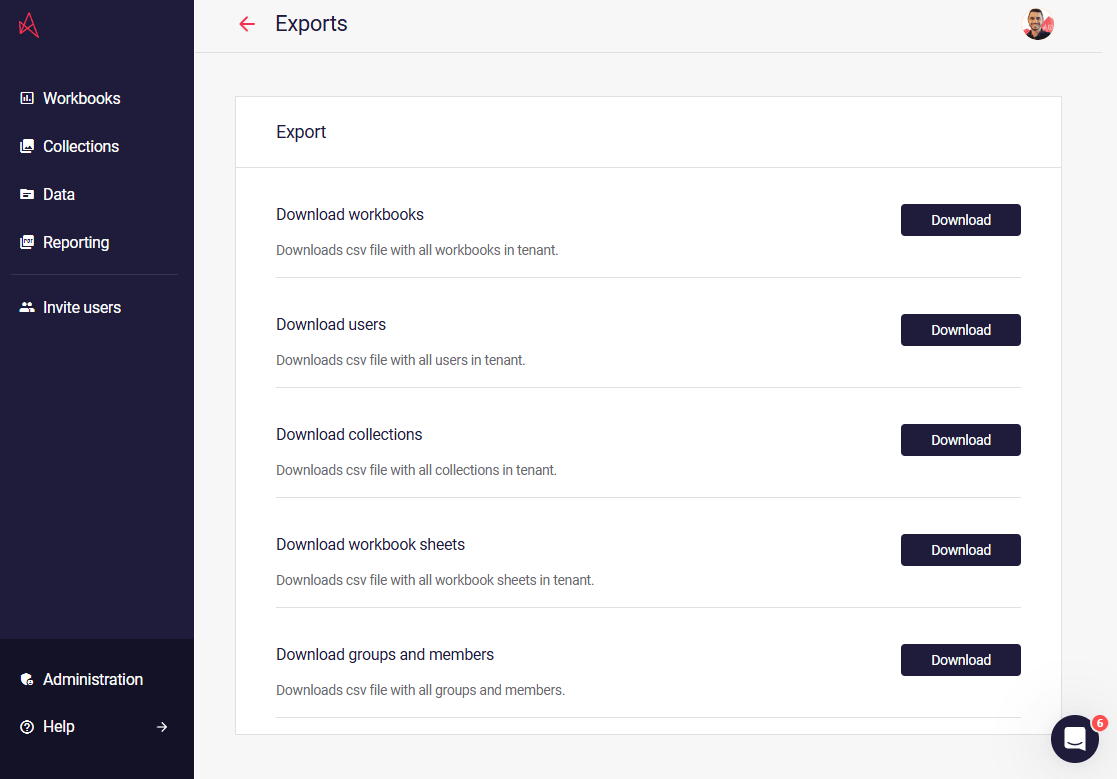
Section titled “Enrichment (important)”Export lookup tables from:
https://app.astrato.io/administration/exportsYou’ll need:
-
workbooks
-
sheets
-
objects
-
users
Join them to resolve IDs → names.
Example business questions
Section titled “Example business questions”a) Most used workbooks
SELECT workbook_id, count() AS queries, uniqExact(user_id) AS usersFROM astrato.query_historyWHERE event_time >= now() - INTERVAL 7 DAYGROUP BY workbook_idORDER BY queries DESC;b) Slowest sheets
SELECT sheet_id, avg(query_duration_ms) AS avg_ms, count() AS queriesFROM astrato.query_historyWHERE event_time >= now() - INTERVAL 7 DAYGROUP BY sheet_idORDER BY avg_ms DESC;c) Most expensive objects (by data scanned)
SELECT object_id, sum(read_bytes) AS bytes_read, count() AS queriesFROM astrato.query_historyWHERE event_time >= now() - INTERVAL 7 DAYGROUP BY object_idORDER BY bytes_read DESC;d) Active users
SELECT user_id, count() AS queries, sum(read_bytes) AS bytes_readFROM astrato.query_historyWHERE event_time >= now() - INTERVAL 30 DAYGROUP BY user_idORDER BY queries DESC;Key notes
Section titled “Key notes”-
system.query_logretention depends on ClickHouse config (ttl/flush_interval) -
use
SYSTEM FLUSH LOGSwhen testing -
always filter
type = 'QueryFinish'to avoid partial queries -
log_commentmust be valid JSON for extraction to work -
avoid internal/system users (
monitoring-internal,sql-console:%)
Why this matters
Section titled “Why this matters”You now have:
-
product analytics (who uses what)
-
performance analytics (how fast, how heavy)
-
full traceability (query → workbook → object → user)
All directly from your warehouse, no extra tracking needed.