

Designing for Scrollable & Mobile Dashboards in Astrato
Automatically route mobile users, to mobile optimized sheets
Section titled “Automatically route mobile users, to mobile optimized sheets”Astrato lets you design for mobile users - unlike other tools who redesign your dashboard for mobile for you, outside of your control.
Mobile users deserve a true mobile analytics experience.
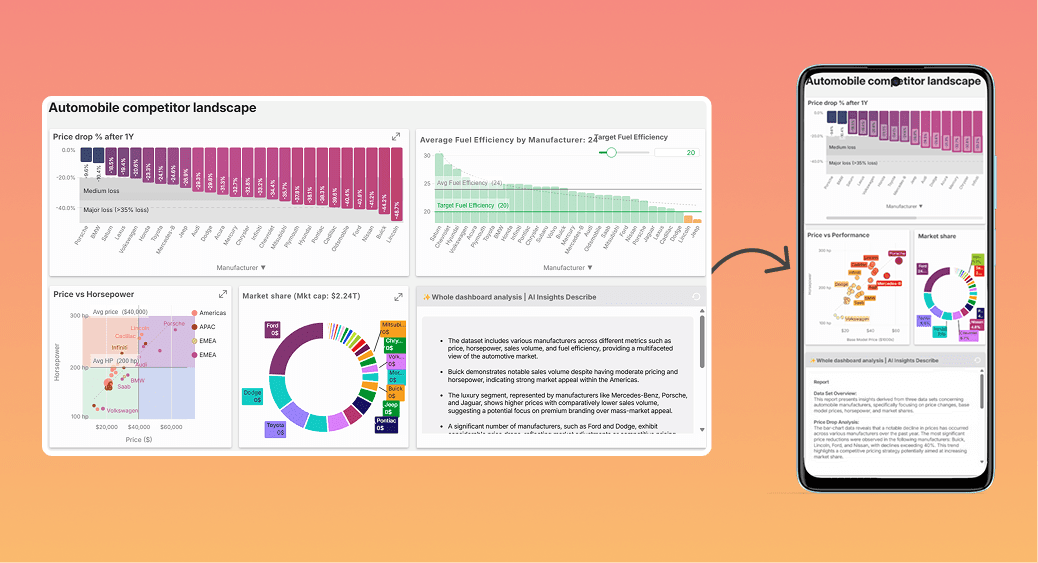
Smallest iPhone viewport
Section titled “Smallest iPhone viewport”375px (w) × 828px (h) is the smallest active iPhone browser viewport.
This is the default space your content has to breathe — so design with this boundary in mind.
Size to use when designing in the editor
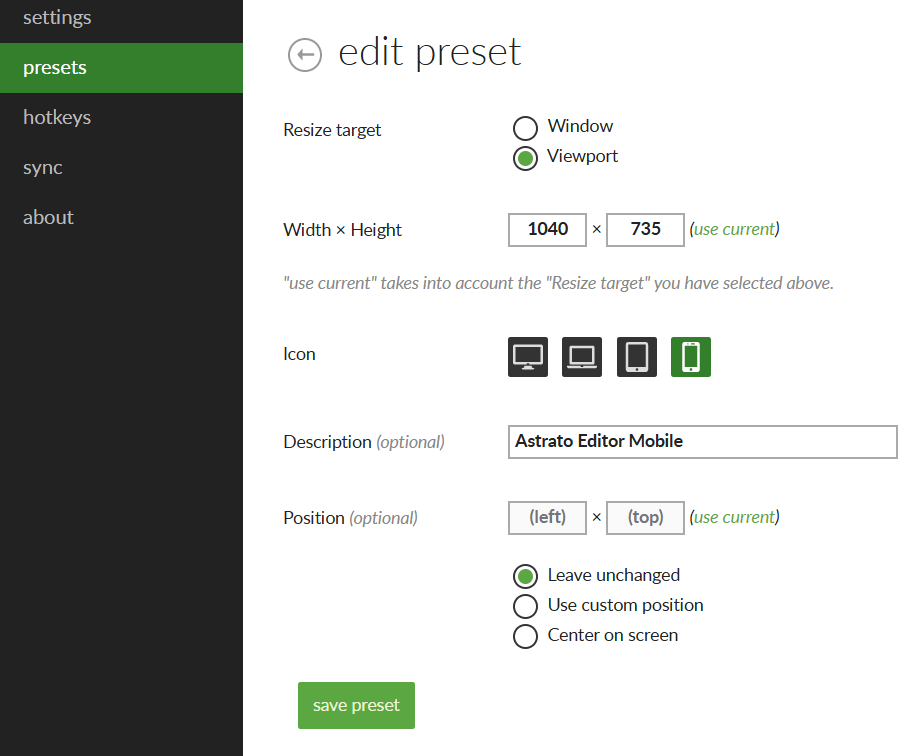
Section titled “Size to use when designing in the editor”When building a scrolling sheet for mobile, set your browser to 947px (h) × 735px (w).
That size matches the visual scale Astrato uses internally, so what you see in the editor mirrors how it feels on device.
Easy way to resize your browser
Section titled “Easy way to resize your browser”Use a Chrome extension like Window Resizer to snap the viewport to those dimensions fast.
You can match the settings below:
Creating a Scrollable Workbook Design in Astrato
Section titled “Creating a Scrollable Workbook Design in Astrato”To speed up the process, we recommend to clone your full-screen sheet in the workbook editor.
In the new sheet, we recommend to Lock aspect ratio of your sheet. This ensures that a mobile view is retained on the sheet and enables you to design on a mobile sized canvas. Choose a paper size or set the aspect ratio to Once complete, you're ready to make your layout mobile friendly. You can also enable scrolling, for example if you want to scroll across 5 "mobile screens", you can set the aspect ratio to 💡 Put your main content at the top of the sheet. | 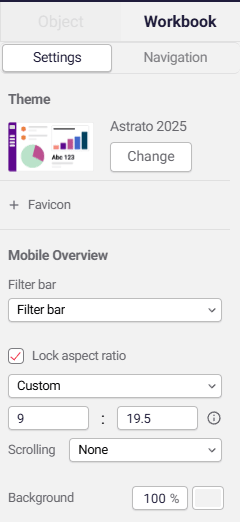 |
Automatically show the right content based on their device
Section titled “Automatically show the right content based on their device”Once you have completed your design, open up Astrato’s actions.

In Actions, add the blocks shown below (use our search to find blocks faster).
These blocks perform the following actions:
-
If the device window is portrait (taller than wider), then go to Mobile Overview.
-
Otherwise, go to Overview.
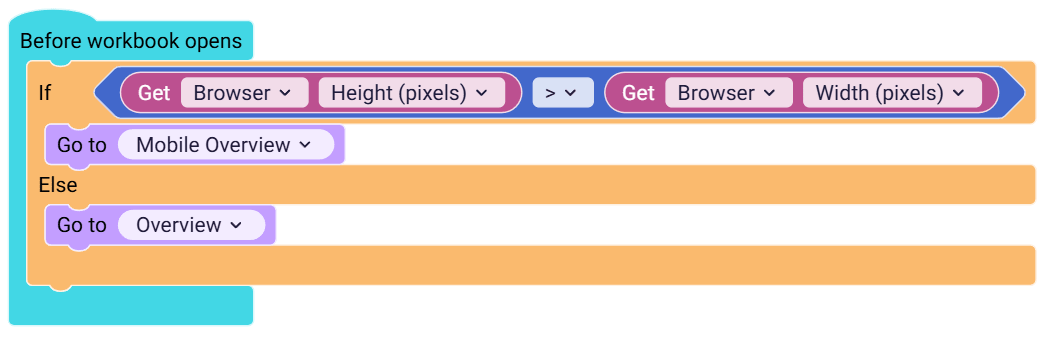
📋Copy the actions codeblock, and paste directly into your actions worksheet
{"serializedActions":{"type":"astrato_actions_event_before_workbook_opens","id":"Mg]1tStANqaD--CtmIae","x":-1012,"y":-698,"inputs":{"DO":{"block":{"type":"controls_ifelse","id":"Fc4n/lE+5{!`[~,Mh:lj","inputs":{"IF0":{"block":{"type":"math_compare","id":"irYEyO/}lO`,!#Ue#Msc","fields":{"math_compare_operation":"GREATER"},"inputs":{"value1":{"shadow":{"type":"custom_math_number","id":"HL;:z%fTHE@ctb3^6]:r","fields":{"NUM":0}},"block":{"type":"get_context_values","id":"5Ut*9dOtwGAnC^W;Fd~g","extraState":{"selected":["browser","browser_height"]},"fields":{"level0":"browser","level1":"browser_height"}}},"value2":{"shadow":{"type":"custom_math_number","id":"6iZEseSVvmc*(bF2zM7F","fields":{"NUM":0}},"block":{"type":"get_context_values","id":"%hr;KX_CZR;``T}~1e#2","extraState":{"selected":["browser","browser_width"]},"fields":{"level0":"browser","level1":"browser_width"}}}}}},"DO0":{"block":{"type":"go_to_sheet_v1","id":",|Q@P;*?#ao2cU][UbL0","inputs":{"selected_sheet":{"shadow":{"type":"custom_dropdown","id":"/jwtVg/f)lJPYOWMq)I~","fields":{"TEXT":"Home (mobile)"}}}}}},"ELSE":{"block":{"type":"go_to_sheet_v1","id":"vi!Y*ixO)4-N+1!L5:El","inputs":{"selected_sheet":{"shadow":{"type":"custom_dropdown","id":"CrHRi`OwgvRc2:xuo*A3","fields":{"TEXT":"Home"}}}}}}}}}}},"workspaceId":"iPrb#;sb;^6r2+,s:csw"}The end Result
Section titled “The end Result”Try it yourself - just change the window size closer to mobile and hit refresh.
ℹ️ Remember you can show and hide sheets in Astrato, with one workbook to serve all types of users.