

Importing a Workbook
Import a Workbook from an .astx archive to move it between tenants, restore it or start from a
template. To create the archive, see exporting a workbook.
You need permission to edit content. Without it, the Import section is missing from the Create menu.
Import a Workbook
Section titled “Import a Workbook”-
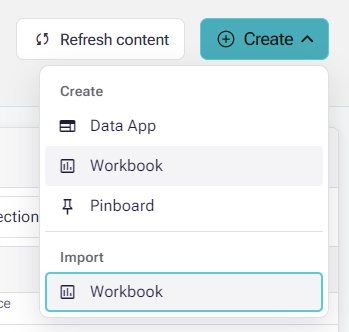
Open the Library and select Create.
-
Under Import, select Workbook.
-
Drop one
.astxfile into the dialog, or click the drop area to choose it. The file must be non-empty and no larger than 200 MB. -
If the archive contains a semantic layer, choose its Data connection. For files up to 32 MiB, when the archive records the source connection’s name and exactly one available connection has the same name, that connection is selected for you. You can change the selection. Larger files, older archives, missing matches and duplicate names need a manual choice.
-
Optionally turn on Use an existing semantic layer and choose a layer on that connection. For files up to 32 MiB, a unique exact match for the archived layer’s name is selected for you; otherwise choose manually. Leave the option off to create a new layer.
-
Select Import workbook. Keep the dialog open until it finishes. On success the dialog closes, a Workbook imported notice appears and the Library refreshes.
New or existing semantic layer
Section titled “New or existing semantic layer”| Choice | What happens |
|---|---|
| Use an existing semantic layer off | Import creates an independent copy of the layer on the chosen connection. An ASTX 3.0 archive with a published semantic layer document keeps it, including business questions, and starts its own version history. Older archives use their archived model. |
| Use an existing semantic layer on | Only the Workbook is imported. The layer’s model, document and version history are unchanged, and the archived document is not applied. Import checks access and model compatibility, not only the name, and an incompatible model blocks the import. |
Your permissions on the target connection still apply, and the connection must provide the tables the model refers to.
If the import fails
Section titled “If the import fails”An error stays in the dialog so you can correct it and try again. If the message says the result could not be confirmed, refresh the Library before trying again: the Workbook may already exist. Importing the same archive again creates another copy.
For what an export includes from the semantic layer editor, see ASTX export.