

Card (object frame)
A card frames one object: a chart, a table or a KPI. This page covers its parts and sizing. The page’s style sets its fill, border, radius and shadow, for example Economist.
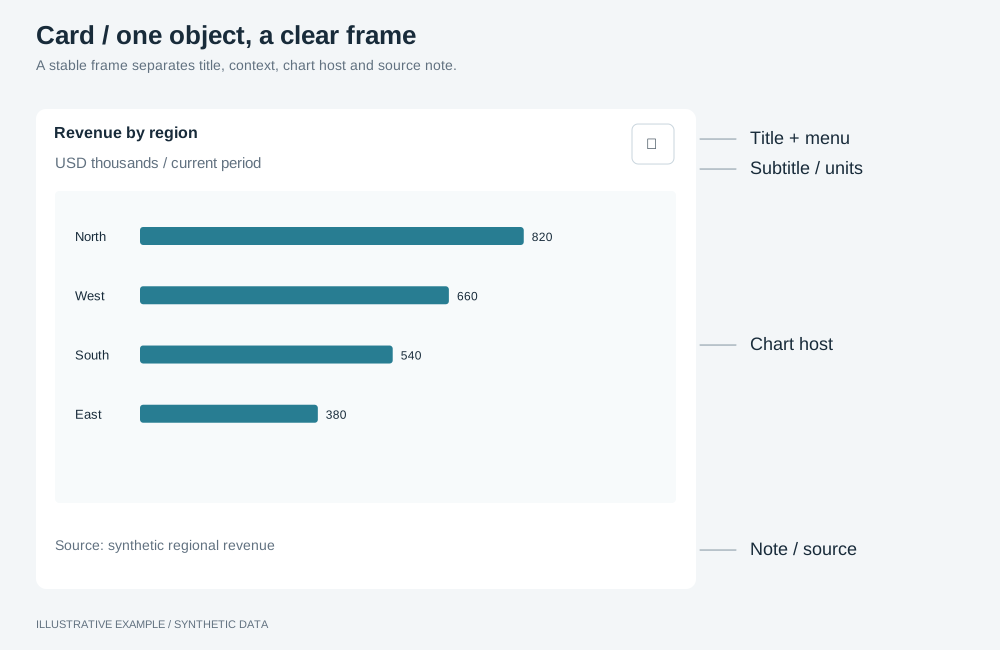
Illustrative example with synthetic data. A stable frame separates title, context, chart host and source note.
When to use a card
Section titled “When to use a card”Put every chart and table in a card, including one that fills the board.
| The object is | Use |
|---|---|
| A headline number with its change | KPI card, inside a card |
| One of several views shown in turn in the same card | In-panel tabs in the title row |
| Loading, empty or failed | The same card, with object states over its host |
Choose a variant
Section titled “Choose a variant”- Does the reader need a source, method or caveat to read the object correctly? Use a card with a note.
- Otherwise, use the card.
| Variant | Parts | Common use cases | Choose another variant when |
|---|---|---|---|
| Card | Title, subtitle, host, menu | Revenue by week. Orders by channel. Top ten products by margin | The reader needs the source or a caveat |
| Card with a note | As above, plus one line under the host | Survey results with the sample size. Figures from an external source. Provisional estimates | The note is longer than one line; put it in the page text |
- Title: one line. State a finding only if it holds for every selection a reader can make; otherwise name the question (“Which regions missed target?”) or the measure and breakdown (“Revenue by region”).
- Subtitle: one line with the unit, scope and period, for example “USD, all regions, by week”. Keep the row when it is empty, so hosts stay aligned.
- Menu button: opens the object menu.
- Host: the element the object mounts into. It fills the rest of the card.
- Note (optional): one line for the source, method or caveat.
Markup
Section titled “Markup”<figure class="chart" data-object-id="revenue-by-week"> <figcaption> <h2 class="chart-title">Revenue by week</h2> <p class="chart-subtitle">USD, all regions</p> </figcaption> <button class="chart-menu" type="button" aria-haspopup="dialog" aria-label="Options for Revenue by week"> <svg aria-hidden="true" viewBox="0 0 16 16" width="16" height="16"><!-- three dots --></svg> </button> <div class="chart-host"></div> <p class="chart-note">Source: finance ledger, closed months only.</p></figure>- Put
data-object-idon the card, so the object menu’s document listener also finds it from the title. - Name each menu button after its object; several buttons named “Options” cannot be told apart.
- Choose the heading level from the page outline.
- Style pages set type and look on
.chart,.chart-title,.chart-subtitle,.chart-hostand.chart-note; keep these class names.
The card reads --surface, --panel-border, --radius, --panel-shadow and --muted from the
style. --chart-min is defined in Tokens and thresholds.
:root {  /* 1 + 6 + 22 + 16 + 6 + 1 = 52: border, padding, title, subtitle, padding, border */  --frame-pad-y: 6px;  --frame-pad-x: 12px;  --frame-title-h: 22px;  --frame-subtitle-h: 16px;  --frame-note-h: 16px;}
.chart { display: grid; grid-template-columns: minmax(0, 1fr) auto; grid-template-rows: var(--frame-title-h) var(--frame-subtitle-h) minmax(0, 1fr) auto; column-gap: 8px; min-width: 0; min-height: 0; margin: 0; padding: var(--frame-pad-y) var(--frame-pad-x); box-sizing: border-box; background: var(--surface); border: var(--panel-border); border-radius: var(--radius); box-shadow: var(--panel-shadow); container-type: inline-size;}.chart > figcaption { grid-area: 1 / 1 / 3 / 2; display: grid; grid-template-rows: var(--frame-title-h) var(--frame-subtitle-h); min-width: 0;}.chart-title,.chart-subtitle,.chart-note { margin: 0; overflow: hidden; white-space: nowrap; text-overflow: ellipsis;}.chart-title { line-height: var(--frame-title-h);}.chart-subtitle { line-height: var(--frame-subtitle-h); color: var(--muted);}.chart-menu { grid-area: 1 / 2 / 3 / 3; align-self: center; width: 28px; height: 28px;}.chart-host { grid-area: 3 / 1 / 4 / -1; min-width: 0; min-height: 0; /* Keeps the object's own z-index values inside the host, below the object states. */ isolation: isolate;}- The title and subtitle rows have fixed heights, so a long title truncates instead of moving the host.
- The 52px sum assumes a 1px
--panel-border. With larger type or no border, change the row or padding tokens and add the difference to--chart-minand to every scrolling threshold that counts chart rows. - Anything else in the title row’s right column, such as in-panel tabs, must fit the 38px of title and subtitle.
Add a note
Section titled “Add a note”.chart-note { grid-area: 4 / 1 / 5 / -1; height: var(--frame-note-h); line-height: var(--frame-note-h); color: var(--muted);}A card with a note needs --chart-min plus 16px. Give every card in a row a note, or none, so the
hosts stay the same size, and add 16px per chart row to the scrolling threshold.
Behaviour
Section titled “Behaviour”Open the menu from the button. The button gives keyboard and touch users the menu that right-click opens. Keep it visible; a hover-only button is unavailable on touch screens.
// openMenu, buildItems and specsById are the ones in /app-object-menu/.declare function openMenu(x: number, y: number, items: unknown[]): void;declare function buildItems(spec: unknown, host: HTMLElement, cell: Element | null): unknown[];declare const specsById: Map<string, unknown>;
document.addEventListener('click', (event) => {  if (!(event.target instanceof Element)) return;  const trigger = event.target.closest<HTMLButtonElement>('.chart-menu');  const card = trigger?.closest<HTMLElement>('[data-object-id]');  const id = card?.dataset.objectId;  if (!trigger || !card || id === undefined) return;  const box = trigger.getBoundingClientRect();  openMenu(box.left, box.bottom, buildItems(specsById.get(id), card, null));});
Mount into .chart-host, not the card, after the card is in the layout; see
Give every host a definite box. Put the height on the
card’s grid row only; see Put the height on exactly one element.
Update the text with the object. The card runs no queries. When a metric switcher changes the measure, update the title and subtitle in the same handler.
Responsive behaviour
Section titled “Responsive behaviour”| Width | Title and subtitle | Host |
|---|---|---|
| Any | One line each, truncated | Fills the rest of the card |
Write titles that fit the narrowest card in the layout.