Query telemetry
Astrato attaches metadata to the queries it sends to your data warehouse: who ran the query, from which workbook, sheet and object, or from which report. Most warehouses already record each query with its duration and the data it read. Put the two together and the warehouse’s own query history becomes a usage and performance dataset: which workbooks are used, by whom, and which ones are slow or expensive.
The metadata carries IDs, not names. To turn them into workbook, sheet and user names, schedule the metadata export, which writes Astrato’s lookup tables into a schema of your own.
What Astrato attaches to a query
Section titled “What Astrato attaches to a query”Queries that workbooks and reports send carry a JSON object like this one. Fields that do not apply
to a query are left out, so a query from a report carries the report… fields and the type
report, and a query outside a sheet has no sheetId or objectId.
{ "type": "query", "dimensions": ["Product Manager", "Customer"], "measures": ["Tickets"], "fields": ["Creator"], "userId": "201526aa-c0d6-4d6e-a62d-9417d4eef153", "roleType": "administrator", "objectId": "1bde66c5-38d4-41d4-81c3-519691584312", "sheetId": "e4035568-90bd-44a6-a5e9-4288f8d4c11a", "workbookId": "a7dbf458-a008-4b83-9d75-84d566f8343f", "workbookState": "published"}| Field | What it holds |
|---|---|
type |
What sent the statement: query for a query built from the semantic layer, sql for SQL run as written, and export, procedure or writeback; report when any report… field is set. |
dimensions, measures, fields |
Names of the dimensions, measures and fields the query uses. |
userId |
The Astrato user who ran it. |
roleType |
That user’s role, such as administrator or viewer. |
workbookId, sheetId, objectId |
The workbook, the sheet and the object on it that sent the query. workbookId is the same for every version of a workbook. |
workbookState |
The version the query came from: draft, readonly, shared_draft, published or depublished. |
reportName, reportRunId, reportRunType, reportDeliveryMethod |
The report and the run that sent the query. |
How the object reaches the warehouse depends on the warehouse:
| Warehouse | Where the metadata is |
|---|---|
| Snowflake, Databricks, PostgreSQL, Supabase | A comment at the end of the SQL text: -- {…} on its own line after the statement, and before the closing ; on queries built from the semantic layer. |
| Google BigQuery | Job labels, one label per field. The SQL text carries no comment. |
| ClickHouse | The log_comment setting of the query, recorded in system.query_log. |
Amazon Redshift, Dremio and DuckDB (MotherDuck) connections get the same SQL comment; this page has no section for reading their query history.
Write the metadata tables into your warehouse
Section titled “Write the metadata tables into your warehouse”The scheduled metadata export writes nine tables of Astrato metadata into a schema on one of your data connections, so you can join query history to names. It writes through a semantic layer, so setting it up takes four steps.
Before you start: you need to be a workspace owner or administrator, and export scheduling has to be enabled for your workspace, or the Export page shows no Scheduled exports. The data connection’s credentials must be allowed to insert into the tables. A Google Sheets connection cannot be used.
- Create the tables in a schema on the warehouse, with the script below. The export writes only into tables that exist.
- Add the tables to a semantic layer on the same data connection. Bring each table in from that schema with Add → Tables & Views; see Bring tables and model items in. Every column the export writes must be a field of its table in the layer.
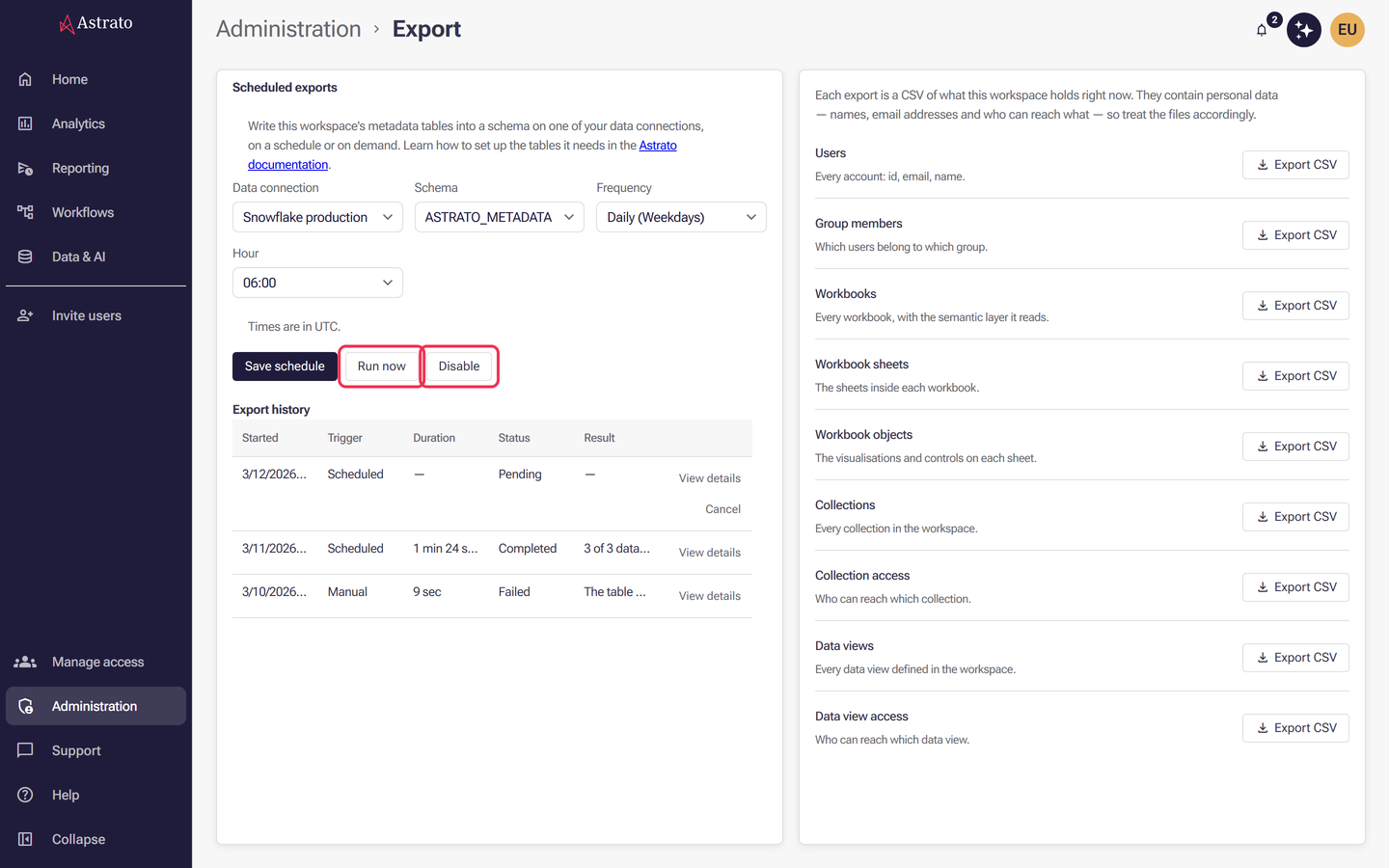
- Schedule the export under Administration → Export: choose that data connection and that schema in the Scheduled exports form and save it. The form, its fields and the export history are described, with a picture of the form, in Schedule metadata exports.
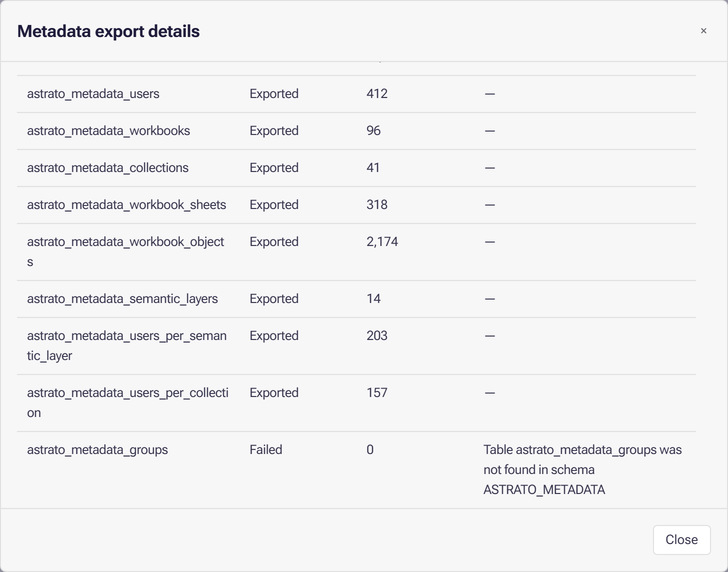
- Run it once with Run now and open View details on the run in Export history to check each table; see If a table is not written.
What the export writes
Section titled “What the export writes”Each run appends rows; it never updates or deletes them. Every row carries EXPORTED_AT, the
time of the run in the schedule’s time zone, so the current state of a table is the set of rows
with its latest EXPORTED_AT. Table names and column names are matched without regard to case.
| Table | Columns | One row per |
|---|---|---|
ASTRATO_METADATA_USERS |
ID, EMAIL, NAME, FIRSTNAME, LASTNAME |
User |
ASTRATO_METADATA_GROUPS |
GROUPID, GROUPNAME, USERID |
Member of a group |
ASTRATO_METADATA_WORKBOOKS |
ID, NAME, DESCRIPTION, SEMANTICLAYERID |
Published workbook; ID matches workbookId |
ASTRATO_METADATA_WORKBOOK_SHEETS |
ID, SHEETNAME, WORKBOOKNAME |
Sheet of a published workbook |
ASTRATO_METADATA_WORKBOOK_OBJECTS |
OBJECTNAME, OBJECTID, SHEETID |
Object on a sheet of a published workbook |
ASTRATO_METADATA_COLLECTIONS |
ID, COLLECTIONNAME, WORKBOOKNAME |
Workbook in a collection |
ASTRATO_METADATA_USERS_PER_COLLECTION |
COLLECTIONID, ID, Name or email, USERACCESSACL |
User, group, role or Everyone with access to a collection |
ASTRATO_METADATA_SEMANTIC_LAYERS |
ID, NAME, DATACONNECTION, DATACONNECTIONID |
Semantic layer |
ASTRATO_METADATA_USERS_PER_SEMANTIC_LAYER |
SEMANTICLAYERID, ID, Name or email, USERACCESSACL |
User, group, role or Everyone with access to a semantic layer |
Every table also has EXPORTED_AT. In the two access tables, ID is a user ID, a group ID, a role
name or Everyone, and USERACCESSACL lists the access levels separated by ;.
Workbooks, sheets and objects come from published versions only. A query run in a draft can carry a
sheetId or objectId that has no row in the export.
The same lists can be downloaded as CSV from the same page; see Platform metadata exports.
Create the metadata tables
Section titled “Create the metadata tables”This script creates the schema and the nine tables. It runs as written on Snowflake and PostgreSQL;
for Google BigQuery and Databricks write STRING for VARCHAR, and for ClickHouse write String
and DateTime64(3) and add ENGINE = MergeTree ORDER BY tuple() to each table.
CREATE SCHEMA IF NOT EXISTS ASTRATO_METADATA;
CREATE TABLE IF NOT EXISTS ASTRATO_METADATA.ASTRATO_METADATA_USERS ( ID VARCHAR, EMAIL VARCHAR, NAME VARCHAR, FIRSTNAME VARCHAR, LASTNAME VARCHAR, EXPORTED_AT TIMESTAMP);CREATE TABLE IF NOT EXISTS ASTRATO_METADATA.ASTRATO_METADATA_GROUPS ( GROUPID VARCHAR, GROUPNAME VARCHAR, USERID VARCHAR, EXPORTED_AT TIMESTAMP);CREATE TABLE IF NOT EXISTS ASTRATO_METADATA.ASTRATO_METADATA_WORKBOOKS ( ID VARCHAR, NAME VARCHAR, DESCRIPTION VARCHAR, SEMANTICLAYERID VARCHAR, EXPORTED_AT TIMESTAMP);CREATE TABLE IF NOT EXISTS ASTRATO_METADATA.ASTRATO_METADATA_WORKBOOK_SHEETS ( ID VARCHAR, SHEETNAME VARCHAR, WORKBOOKNAME VARCHAR, EXPORTED_AT TIMESTAMP);CREATE TABLE IF NOT EXISTS ASTRATO_METADATA.ASTRATO_METADATA_WORKBOOK_OBJECTS ( OBJECTNAME VARCHAR, OBJECTID VARCHAR, SHEETID VARCHAR, EXPORTED_AT TIMESTAMP);CREATE TABLE IF NOT EXISTS ASTRATO_METADATA.ASTRATO_METADATA_COLLECTIONS ( ID VARCHAR, COLLECTIONNAME VARCHAR, WORKBOOKNAME VARCHAR, EXPORTED_AT TIMESTAMP);CREATE TABLE IF NOT EXISTS ASTRATO_METADATA.ASTRATO_METADATA_USERS_PER_COLLECTION ( COLLECTIONID VARCHAR, ID VARCHAR, NAME_OR_EMAIL VARCHAR, USERACCESSACL VARCHAR, EXPORTED_AT TIMESTAMP);CREATE TABLE IF NOT EXISTS ASTRATO_METADATA.ASTRATO_METADATA_SEMANTIC_LAYERS ( ID VARCHAR, NAME VARCHAR, DATACONNECTION VARCHAR, DATACONNECTIONID VARCHAR, EXPORTED_AT TIMESTAMP);CREATE TABLE IF NOT EXISTS ASTRATO_METADATA.ASTRATO_METADATA_USERS_PER_SEMANTIC_LAYER ( SEMANTICLAYERID VARCHAR, ID VARCHAR, NAME_OR_EMAIL VARCHAR, USERACCESSACL VARCHAR, EXPORTED_AT TIMESTAMP);EXPORTED_AT is sent as text in the form 2026-09-14 12:00:00.000. A TIMESTAMP column works
where the warehouse converts that text on insert, as Snowflake does. If a run fails on
EXPORTED_AT, make the column text instead.
If a table is not written
Section titled “If a table is not written”View details on a run lists each table with its status, exported rows and a message. A table that did not export is shown as Failed, and the message says why:
| Message | What to do |
|---|---|
Table … was not found in schema … |
Create the table in the schema the schedule writes to. The rest of the run carries on without it. |
No semantic view found for table … in schema … and datasource … |
Add the table to a semantic layer on the schedule’s data connection, from that schema. |
Column … is not mapped in semantic view fields |
Add a field for that column to the table in the semantic layer; for Name or email, see the caution above. |
Failed to write batch into … |
The warehouse refused the insert. The rest of the message is the warehouse’s error, such as a missing privilege. |
Snowflake
Section titled “Snowflake”Snowflake keeps query text in SNOWFLAKE.ACCOUNT_USAGE.QUERY_HISTORY. Reading it needs a role
with access to the SNOWFLAKE database’s account usage views; rows arrive there with some delay.
Astrato’s Snowflake connections set the session query tag Astrato, so QUERY_TAG = 'Astrato'
picks out Astrato’s statements without scanning the text of every query in the account. The tag
is also on Astrato statements that carry no metadata comment.
This view extracts the comment from each Astrato query and parses it. Create it in a database of
your own, here ASTRATO_TELEMETRY:
CREATE DATABASE IF NOT EXISTS ASTRATO_TELEMETRY;
CREATE OR REPLACE VIEW ASTRATO_TELEMETRY.PUBLIC.ASTRATO_QUERIES ASWITH tagged AS (  SELECT    q.*,    TRY_PARSE_JSON(REGEXP_SUBSTR(q.QUERY_TEXT, '-- (\\{.*\\})', 1, 1, 'e', 1)) AS META  FROM SNOWFLAKE.ACCOUNT_USAGE.QUERY_HISTORY AS q  WHERE q.QUERY_TAG = 'Astrato')SELECT  QUERY_ID, START_TIME, END_TIME, USER_NAME, ROLE_NAME, WAREHOUSE_NAME, WAREHOUSE_SIZE,  EXECUTION_STATUS, TOTAL_ELAPSED_TIME, COMPILATION_TIME, EXECUTION_TIME,  QUEUED_PROVISIONING_TIME, QUEUED_OVERLOAD_TIME, BYTES_SCANNED, PERCENTAGE_SCANNED_FROM_CACHE,  BYTES_SPILLED_TO_LOCAL_STORAGE, BYTES_SPILLED_TO_REMOTE_STORAGE, CREDITS_USED_CLOUD_SERVICES,  META:type::STRING                 AS ASTRATO_TYPE,  META:userId::STRING               AS ASTRATO_USER_ID,  META:roleType::STRING             AS ASTRATO_ROLE_TYPE,  META:workbookId::STRING           AS ASTRATO_WORKBOOK_ID,  META:sheetId::STRING              AS ASTRATO_SHEET_ID,  META:objectId::STRING             AS ASTRATO_OBJECT_ID,  META:workbookState::STRING        AS ASTRATO_WORKBOOK_STATE,  META:reportName::STRING           AS ASTRATO_REPORT_NAME,  META:reportRunId::STRING          AS ASTRATO_REPORT_RUN_ID,  META:reportRunType::STRING        AS ASTRATO_REPORT_RUN_TYPE,  META:reportDeliveryMethod::STRING AS ASTRATO_REPORT_DELIVERY_METHOD,  META:dimensions                   AS ASTRATO_DIMENSIONS,  META:measures                     AS ASTRATO_MEASURES,  META:fields                       AS ASTRATO_FIELDSFROM taggedWHERE META IS NOT NULL;
The last line keeps only statements that carry metadata; remove it to see every statement Astrato ran, with the metadata columns left empty where there is none.
Account usage keeps a limited history. To keep your own, copy the view into a table and add the
new rows on a schedule. Replace MY_WH with a warehouse the task can use:
CREATE TABLE IF NOT EXISTS ASTRATO_TELEMETRY.PUBLIC.QUERY_HISTORY ASSELECT * FROM ASTRATO_TELEMETRY.PUBLIC.ASTRATO_QUERIES;
CREATE OR REPLACE TASK ASTRATO_TELEMETRY.PUBLIC.STORE_ASTRATO_QUERIES  WAREHOUSE = MY_WH  SCHEDULE = 'USING CRON 0 3 * * * UTC'AS  INSERT INTO ASTRATO_TELEMETRY.PUBLIC.QUERY_HISTORY  SELECT v.*  FROM ASTRATO_TELEMETRY.PUBLIC.ASTRATO_QUERIES AS v  WHERE NOT EXISTS (    SELECT 1 FROM ASTRATO_TELEMETRY.PUBLIC.QUERY_HISTORY AS h WHERE h.QUERY_ID = v.QUERY_ID  );
ALTER TASK ASTRATO_TELEMETRY.PUBLIC.STORE_ASTRATO_QUERIES RESUME;
With the metadata export writing into ASTRATO_TELEMETRY.ASTRATO_METADATA, this answers which
workbooks and users took the most query time in the last 30 days. Each lookup keeps only the rows
of the latest export, with a subquery that works the same way in every warehouse on this page:
WITH workbooks AS ( SELECT ID, NAME FROM ASTRATO_TELEMETRY.ASTRATO_METADATA.ASTRATO_METADATA_WORKBOOKS WHERE EXPORTED_AT = ( SELECT MAX(EXPORTED_AT) FROM ASTRATO_TELEMETRY.ASTRATO_METADATA.ASTRATO_METADATA_WORKBOOKS )),users AS ( SELECT ID, EMAIL FROM ASTRATO_TELEMETRY.ASTRATO_METADATA.ASTRATO_METADATA_USERS WHERE EXPORTED_AT = ( SELECT MAX(EXPORTED_AT) FROM ASTRATO_TELEMETRY.ASTRATO_METADATA.ASTRATO_METADATA_USERS ))SELECT COALESCE(w.NAME, h.ASTRATO_WORKBOOK_ID) AS WORKBOOK, COALESCE(u.EMAIL, h.ASTRATO_USER_ID) AS ASTRATO_USER, COUNT(*) AS QUERIES, SUM(h.TOTAL_ELAPSED_TIME) / 1000 AS SECONDSFROM ASTRATO_TELEMETRY.PUBLIC.QUERY_HISTORY AS hLEFT JOIN workbooks AS w ON w.ID = h.ASTRATO_WORKBOOK_IDLEFT JOIN users AS u ON u.ID = h.ASTRATO_USER_IDWHERE h.START_TIME >= DATEADD(day, -30, CURRENT_TIMESTAMP())GROUP BY 1, 2ORDER BY SECONDS DESC;This measures query time, not credits. For the Snowflake credits Astrato’s queries use, see Watch what Astrato costs.
To see how long people spend in a workbook, group each user’s queries on it into sessions: a query that starts more than five minutes after the previous one ended starts a new session. A session here spans the user’s queries, so time spent reading a sheet after its last query is not counted.
WITH gaps AS ( SELECT ASTRATO_USER_ID, ASTRATO_WORKBOOK_ID, START_TIME, END_TIME, CASE WHEN TIMESTAMPDIFF(minute, LAG(END_TIME) OVER ( PARTITION BY ASTRATO_USER_ID, ASTRATO_WORKBOOK_ID ORDER BY START_TIME ), START_TIME) <= 5 THEN 0 ELSE 1 END AS NEW_SESSION FROM ASTRATO_TELEMETRY.PUBLIC.QUERY_HISTORY WHERE ASTRATO_WORKBOOK_ID IS NOT NULL),numbered AS ( SELECT *, SUM(NEW_SESSION) OVER ( PARTITION BY ASTRATO_USER_ID, ASTRATO_WORKBOOK_ID ORDER BY START_TIME ROWS BETWEEN UNBOUNDED PRECEDING AND CURRENT ROW ) AS SESSION_NO FROM gaps)SELECT ASTRATO_USER_ID, ASTRATO_WORKBOOK_ID, SESSION_NO, MIN(START_TIME) AS SESSION_START, DATEDIFF(minute, MIN(START_TIME), MAX(END_TIME)) AS MINUTES, COUNT(*) AS QUERIESFROM numberedGROUP BY 1, 2, 3ORDER BY SESSION_START DESC;Google BigQuery
Section titled “Google BigQuery”BigQuery queries carry no comment; each field is a job label instead. Label keys are the field
names in snake case: type, user_id, role_type, workbook_id, sheet_id, object_id,
workbook_state, report_name, report_run_id, report_run_type and
report_delivery_method. Dimensions, measures and fields become numbered labels d1, d2…,
m1… and f1….
BigQuery allows only lower-case letters, digits, _ and - in a label value, at most 63
characters, so Astrato encodes other characters and truncates long values. IDs arrive unchanged;
names in report_name and the numbered labels do not reliably decode back to the original, so
join on IDs.
This query reads the last seven days of Astrato jobs from INFORMATION_SCHEMA.JOBS_BY_PROJECT.
Replace region-eu with the region your jobs run in:
SELECT j.job_id, j.creation_time, j.user_email, j.state, j.cache_hit, j.total_bytes_processed, j.total_bytes_billed, j.total_slot_ms, TIMESTAMP_DIFF(j.end_time, j.start_time, MILLISECOND) AS duration_ms, (SELECT l.value FROM UNNEST(j.labels) AS l WHERE l.key = 'type') AS astrato_type, (SELECT l.value FROM UNNEST(j.labels) AS l WHERE l.key = 'user_id') AS astrato_user_id, (SELECT l.value FROM UNNEST(j.labels) AS l WHERE l.key = 'workbook_id') AS astrato_workbook_id, (SELECT l.value FROM UNNEST(j.labels) AS l WHERE l.key = 'sheet_id') AS astrato_sheet_id, (SELECT l.value FROM UNNEST(j.labels) AS l WHERE l.key = 'object_id') AS astrato_object_id, (SELECT l.value FROM UNNEST(j.labels) AS l WHERE l.key = 'workbook_state') AS astrato_workbook_state, (SELECT l.value FROM UNNEST(j.labels) AS l WHERE l.key = 'report_run_id') AS astrato_report_run_idFROM `region-eu`.INFORMATION_SCHEMA.JOBS_BY_PROJECT AS jWHERE j.job_type = 'QUERY' AND j.creation_time >= TIMESTAMP_SUB(CURRENT_TIMESTAMP(), INTERVAL 7 DAY) AND EXISTS (SELECT 1 FROM UNNEST(j.labels) AS l WHERE l.key = 'type');The type label is set on every job that carries Astrato metadata. If other tools in your project
also label jobs with type, filter on workbook_id or user_id instead.
To keep a history beyond what INFORMATION_SCHEMA holds, save the query as a view and copy new
jobs into a table on a schedule with
BigQuery scheduled queries, inserting
only job_ids the table does not have yet.
This joins the last 30 days of saved jobs, here in a table astrato_telemetry.query_history, to
the latest export in a dataset astrato_metadata to find the slowest sheets:
WITH sheets AS ( SELECT ID, SHEETNAME, WORKBOOKNAME FROM astrato_metadata.ASTRATO_METADATA_WORKBOOK_SHEETS WHERE EXPORTED_AT = (SELECT MAX(EXPORTED_AT) FROM astrato_metadata.ASTRATO_METADATA_WORKBOOK_SHEETS))SELECT s.WORKBOOKNAME, COALESCE(s.SHEETNAME, h.astrato_sheet_id) AS sheet, COUNT(*) AS queries, AVG(h.duration_ms) AS avg_duration_msFROM astrato_telemetry.query_history AS hLEFT JOIN sheets AS s ON s.ID = h.astrato_sheet_idWHERE h.creation_time >= TIMESTAMP_SUB(CURRENT_TIMESTAMP(), INTERVAL 30 DAY) AND h.astrato_sheet_id IS NOT NULLGROUP BY 1, 2ORDER BY avg_duration_ms DESCLIMIT 20;ClickHouse
Section titled “ClickHouse”ClickHouse records the metadata in the log_comment column of system.query_log. Astrato sets it
only when the ClickHouse user it connects as is not read-only: if that user’s readonly setting
is anything but 0, queries arrive without metadata.
This view keeps one row per completed Astrato query. system.query_log also logs each query’s
start and any exception, which type = 'QueryFinish' leaves out:
CREATE DATABASE IF NOT EXISTS astrato_telemetry;
CREATE OR REPLACE VIEW astrato_telemetry.astrato_queries ASSELECT  event_time,  query_id,  user,  query_duration_ms,  read_rows,  read_bytes,  result_rows,  memory_usage,  JSONExtractString(log_comment, 'type')          AS astrato_type,  JSONExtractString(log_comment, 'userId')        AS astrato_user_id,  JSONExtractString(log_comment, 'workbookId')    AS astrato_workbook_id,  JSONExtractString(log_comment, 'sheetId')       AS astrato_sheet_id,  JSONExtractString(log_comment, 'objectId')      AS astrato_object_id,  JSONExtractString(log_comment, 'workbookState') AS astrato_workbook_state,  JSONExtractString(log_comment, 'reportRunId')   AS astrato_report_run_id,  JSONExtract(log_comment, 'dimensions', 'Array(String)') AS astrato_dimensions,  JSONExtract(log_comment, 'measures', 'Array(String)')   AS astrato_measuresFROM system.query_logWHERE type = 'QueryFinish'  AND isValidJSON(log_comment)  AND JSONHas(log_comment, 'type');
ClickHouse writes system.query_log in batches every few seconds, so a query you have just run may
not be there yet. When testing, run SYSTEM FLUSH LOGS before querying the view.
How long system.query_log is kept depends on your server’s configuration, and on a cluster each
replica keeps its own. To keep your own history, copy the view into a table, then run the INSERT
on a schedule. event_time is only precise to the second, and queries that finish in the same
second can be written to the log in different batches. The INSERT therefore rereads the hour
before the latest saved query and skips any query_id the table already has:
CREATE TABLE IF NOT EXISTS astrato_telemetry.query_historyENGINE = MergeTreeORDER BY (event_time, query_id)AS SELECT * FROM astrato_telemetry.astrato_queries;
INSERT INTO astrato_telemetry.query_historySELECT * FROM astrato_telemetry.astrato_queriesWHERE event_time + INTERVAL 1 HOUR >= (SELECT max(event_time) FROM astrato_telemetry.query_history)  AND query_id NOT IN (    SELECT query_id FROM astrato_telemetry.query_history    WHERE event_time + INTERVAL 1 HOUR >= (SELECT max(event_time) FROM astrato_telemetry.query_history)  );
This finds the slowest sheets over the last 30 days, with the export written to a database
astrato_metadata:
WITH sheets AS ( SELECT ID, SHEETNAME, WORKBOOKNAME FROM astrato_metadata.ASTRATO_METADATA_WORKBOOK_SHEETS WHERE EXPORTED_AT = (SELECT max(EXPORTED_AT) FROM astrato_metadata.ASTRATO_METADATA_WORKBOOK_SHEETS))SELECT s.WORKBOOKNAME, if(s.SHEETNAME = '', h.astrato_sheet_id, s.SHEETNAME) AS sheet, count() AS queries, avg(h.query_duration_ms) AS avg_duration_msFROM astrato_telemetry.query_history AS hLEFT JOIN sheets AS s ON s.ID = h.astrato_sheet_idWHERE h.event_time >= now() - INTERVAL 30 DAY AND h.astrato_sheet_id != ''GROUP BY 1, 2ORDER BY avg_duration_ms DESCLIMIT 20;ClickHouse fills the unmatched columns of a LEFT JOIN with empty strings rather than NULL, so
the sheet name falls back with if.
Databricks
Section titled “Databricks”Databricks records statements in the system.query.history system table, if system tables are
enabled for your account. This query extracts and parses the comment:
SELECT statement_id, start_time, executed_by, execution_status, total_duration_ms, execution_duration_ms, read_bytes, spilled_local_bytes, get_json_object(meta, '$.type') AS astrato_type, get_json_object(meta, '$.userId') AS astrato_user_id, get_json_object(meta, '$.workbookId') AS astrato_workbook_id, get_json_object(meta, '$.sheetId') AS astrato_sheet_id, get_json_object(meta, '$.objectId') AS astrato_object_id, get_json_object(meta, '$.workbookState') AS astrato_workbook_state, get_json_object(meta, '$.reportRunId') AS astrato_report_run_id, from_json(get_json_object(meta, '$.dimensions'), 'array<string>') AS astrato_dimensionsFROM ( SELECT *, regexp_extract(statement_text, r'-- (\{.*\})', 1) AS meta FROM system.query.history WHERE start_time >= current_timestamp() - INTERVAL 7 DAYS AND statement_text LIKE '%-- {%') AS hWHERE meta <> '';To keep a history, save it as a view in a schema of your own, create a table from the view and add
the statement_ids the table does not have yet on a schedule, for example with a Databricks job.
Join astrato_workbook_id and astrato_user_id to the ID columns of the latest export the same
way as the Snowflake example; its WHERE EXPORTED_AT = (SELECT MAX(EXPORTED_AT) …)
lookups run on Databricks unchanged once the table names are your own.
PostgreSQL and Supabase
Section titled “PostgreSQL and Supabase”PostgreSQL keeps no per-query history of its own, so there are two sources, each with a limit.
pg_stat_statements keeps running totals per query shape. Queries that differ only in their
comment share one row, and the row’s text is that of one execution, so the metadata on a row is an
example, not an attribution: it cannot tell you which users or workbooks ran that shape. Use it to
find the most expensive query shapes and where one of them came from.
The extension has to be loaded by the server and created in the database you query from. On your
own server, add pg_stat_statements to shared_preload_libraries in the server configuration,
which takes a restart, then run:
CREATE EXTENSION IF NOT EXISTS pg_stat_statements;On Supabase, enable pg_stat_statements among the database extensions in the dashboard, or run the
same statement. Then:
SELECT s.queryid, s.calls, s.total_exec_time, s.mean_exec_time, s.rows, substring(s.query from '-- (\{.*\})')::jsonb AS example_metadataFROM pg_stat_statements AS sWHERE s.query LIKE '%-- {%'ORDER BY s.total_exec_time DESCLIMIT 50;The server log records every statement with its full text, comment included, once statement logging is on. Setting it for the role Astrato connects as keeps other traffic out of the log:
ALTER ROLE astrato_user SET log_min_duration_statement = 0;Replace astrato_user with the user of your Astrato data connection; the setting applies to its
new sessions. Each log line then holds the statement’s duration and text. Supabase shows the
Postgres log in its dashboard; on your own server, how you collect the log is up to you. Once the
statement text is in a table, the same expression extracts the metadata:
substring(statement_text from '-- (\{.*\})')::jsonb.
What next
Section titled “What next”- Schedule metadata exports — the form that writes the lookup tables, and its export history.
- Data connections — the connection the export writes through, and a guide for each warehouse.