Private Preview
Set parameter and field values
Each parameter of a stored or virtual procedure, and each key or writable field of a writable table, has a Value control and a settings chip. Use them to fill values from the signed-in user and to say what a field or parameter stands for.
Fill values from the signed-in user
Section titled “Fill values from the signed-in user”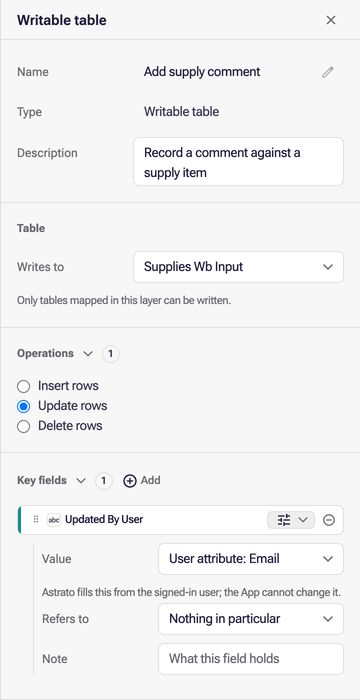
The Value control edits an explicit argument or field binding. Supported choices include an App parameter or trusted Email, User ID and Name context. Changing a binding does not remove or rewrite the public parameter’s metadata or default, except on a virtual procedure as described below. A binding the control cannot represent stays intact, with that edit disabled and explained; other supported edits remain available.
On a virtual procedure, selecting Email, User ID or Name for a declared parameter replaces its declaration with a binding of the same name, so statements keep using {NAME:type} and the App is no longer asked for it. The parameter’s default, Refers to and Note go with the declaration. Selecting Any value on that binding declares the parameter again as text, without them. If a statement also names the parameter directly, for example {P} alongside a binding that reads P, the declaration stays and the App is still asked for P; only that binding changes. A parameter cannot take a user attribute while a different binding already uses its name.
A virtual procedure parameter with no binding takes its value from the caller unless you select a user attribute for it.
A writable table’s listed key and writable fields expose the same Value control behind the field’s chip. Bindings can also contain explicit literals or input-row references. The structured controls preserve those definitions rather than inferring replacements from their field names.
These controls record trusted identity bindings for the definition. The editor does not run them. Metadata references describe meaning and do not supply values.
Say what a field or parameter stands for
Section titled “Say what a field or parameter stands for”Each listed field and each procedure parameter carries a chip that opens two settings. Refers to names the field, dimension, measure or SQL parameter whose values it takes: Products › Id for a P_PRODUCT_ID argument, or for a key field that holds a product id. The list offers every field of the layer grouped by table, then its dimensions, measures and parameters. Note is free text on what to pass, or what the field holds. Both are saved with the workflow, follow renames, and are cleared when what they refer to is deleted; a reference to something the layer no longer has is reported in Issues.
Agents can inspect this authored metadata through MCP. Parameters carry descriptions, references, nullability and optional defaults; an omitted default differs from an explicit null, false or zero. Field notes carry descriptions and references. Existing business-question references are displayed and preserved.
Saving or duplicating a workflow preserves properties outside the current controls, including inactive dialects. History and version compare show those properties as well.