Private Preview
Review and govern Business Workflows
Inspect lineage
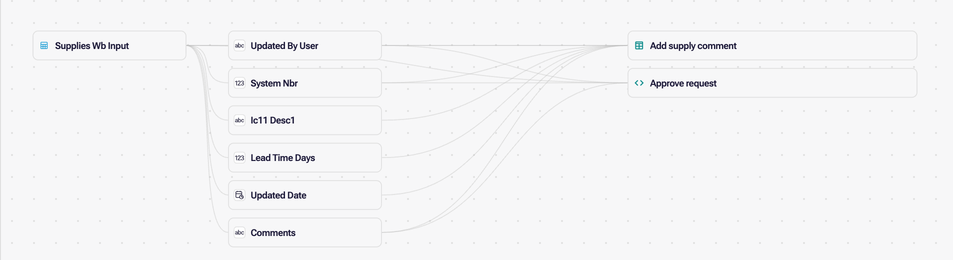
Section titled “Inspect lineage”Lineage includes writable tables, stored procedures and virtual procedures while Business Workflows are enabled. Select a workflow to highlight its connections and open Mapped workflow connections. A stored-procedure workflow has a single Calls connection to its warehouse procedure. Its implementation is unknown, so its parameter context does not create table or field connections.
For writable tables and virtual procedures, the list identifies Read, Write, Row count check and Refers to connections. Refers to identifies authored context or registration metadata; it does not establish a read or write. The list states when SQL effects are incomplete, and SQL targets that cannot be mapped remain unknown.
Virtual-procedure lineage follows nonrecursive CTEs (WITH queries), including chained CTEs and named output columns, back to their mapped tables and fields. Subqueries used as tables in FROM also preserve their column aliases. Recursive CTEs, scalar or correlated subqueries, and dynamic SQL are not analyzed.
Record the write policy
Section titled “Record the write policy”In Settings → Business Workflows, Write access has two settings:
- Business Workflows records that writes should require a registered workflow.
- Data connection permissions (marked Legacy) records that writes should use the connection’s permissions.

These settings are preparation metadata. They do not establish an executable workflow or change the existing explicit table-write and procedure APIs.
A layer that uses data connection permissions and has workflows registered shows an amber note above the Business Workflows list and a warning under Settings in the Issues panel, “Workflows do not limit writes”. Neither stops you from publishing. Workflows have no separate user or group ACL: the trusted write implementation owns business authorization. A view’s read filter does not restrict writes.
Resource permissions and warehouse privileges still apply.
Compare versions
Section titled “Compare versions”Workflow version comparison shows parameter and field notes, references, identity sources, SQL statements, row guards and execution settings. The property count includes writable-field settings; table columns remain separate changes. Restoring a workflow advances the current-version label while preserving the earlier version selected for comparison. The docked History comparison stacks the revisions when space is limited to keep each definition readable.
What next
Section titled “What next”- Business Workflows examples — complete workflows to adapt.
- Business Workflows and Apps — run a published workflow from an App.
- Business Workflows overview — the workflow types and how one runs.