Search and wildcards in filters
A filter condition with the Like or Not like operator takes a pattern rather than an exact
value. Every filter in the Semantic Layer Editor, such as a measure filter, a business question
filter or a reusable filter, reads that pattern in Astrato’s search syntax, not as SQL. Custom
group rules are the exception and use SQL LIKE; see
Custom group rules use SQL wildcards.
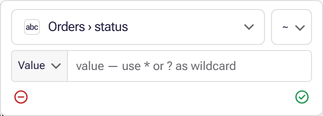
In most filters the value box shows which syntax applies. Once you choose Like or Not like,
its placeholder reads value — use * or ? as wildcard in an ordinary filter and
value — use % as wildcard in a custom group rule built in Advanced. A custom group rule
with Advanced off shows only value, but it uses SQL wildcards too.
The search syntax
Section titled “The search syntax”| Character | Meaning |
|---|---|
* |
Any run of characters, including none |
? |
Exactly one character |
\ |
Makes the next * or ? an ordinary character; \\ is one \ |
%, _ |
Ordinary characters. They are not wildcards here |
Three rules follow from the table:
- A pattern with no wildcard matches anywhere in the text, as Contains does.
brasskeeps “Brass”, “BRASS” and “Small brass box”. - A pattern with a wildcard matches the whole text. Nothing is added at either end, so put a
*wherever other characters may appear. - Matching ignores case on every database except Google Sheets, where case must match.
lg*andLG*keep the same rows everywhere else.
Examples
Section titled “Examples”| Pattern | Keeps text that |
|---|---|
brass |
contains “brass” |
LG* |
starts with “LG” |
*BRASS |
ends with “BRASS” |
*LG* |
contains “LG”, the same as LG |
SM*BOX |
starts with “SM” and ends with “BOX” |
??BOX |
is exactly five characters long and ends with “BOX” |
?nited |
is exactly six characters long, such as “United”, but not “United States” |
*?nited* |
contains any character followed by “nited”, so “United States” too |
5\* |
contains 5* |
\? |
contains a question mark |
A_B |
contains “A_B”; the underscore matches only an underscore |
100\% |
contains “100%” |
A \ in front of any character other than *, ? or \ is dropped, so \a\b\c is the same as
abc. In front of % it does not change the match, but it stops the % being reported: 100%
and 100\% both keep text containing “100%”, and only 100\% is accepted without a warning, as
the next section explains.
A % in a pattern
Section titled “A % in a pattern”% is the SQL wildcard, and a pattern copied from SQL often carries one. Here it matches only
itself, so LG% keeps nothing but text containing “LG%”: Like finds no rows and Not like
keeps them all.
To catch this, every unescaped % in a Like or Not like value outside a custom group is
reported. In the editor it is a warning titled Like pattern uses % as a wildcard on
Semantic layer issues, and its message names the pattern to use instead:
LG* for LG%, *BRASS for %BRASS, and LG or Contains for %LG%. MCP tools refuse a
new value of this kind; Filter conditions describes when.
For a literal percent sign, use Contains, or escape it as \%, which is not reported.
Custom group rules use SQL wildcards
Section titled “Custom group rules use SQL wildcards”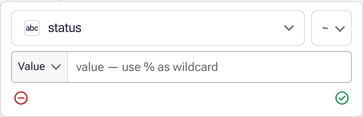
A rule in a custom groups dimension compiles
Like and Not like into the database’s own SQL LIKE. Inside a rule:
%matches any run of characters and_matches one character.*and?match themselves.- Nothing is added at either end, so a pattern without
%must match the whole value. Write%LG%for text containing LG. - Whether case matters is up to the database’s
LIKE; Astrato does not make it case-insensitive.
The Like pattern uses % as a wildcard warning is never raised for a custom group rule,
because there % is the right wildcard.
Where next
Section titled “Where next”- Define a measure in Business Context covers the Measure filter these patterns are most often written in.
- Associative filters covers reusable filters.
- Filter conditions gives the stored form of each operator for MCP authoring.