

Semantic Layer | AI Context [Draft]
AI Context
Section titled “AI Context”Overview
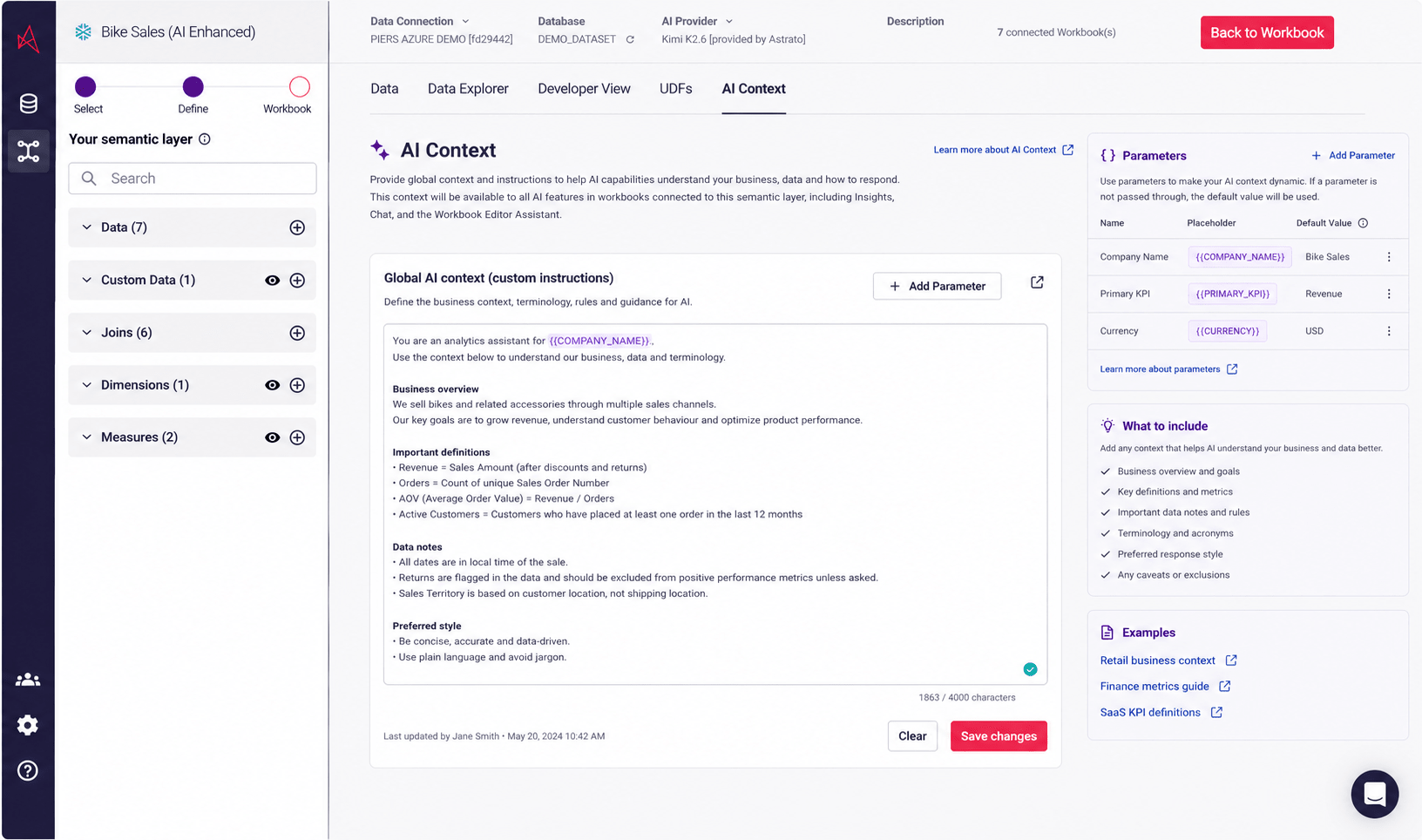
Section titled “Overview”AI Context allows Semantic Layer admins to define shared business context and custom instructions for AI capabilities across Astrato workbooks.
The context is stored directly in the Semantic Layer and automatically made available to downstream AI-powered features.
This creates a reusable source of truth for:
-
Business terminology
-
KPI definitions
-
Data caveats
-
Preferred response style
-
Important rules and exclusions
-
Company-specific acronyms and language
AI Context behaves similarly to custom instructions for AI, but scoped to the Semantic Layer.
Where to find it
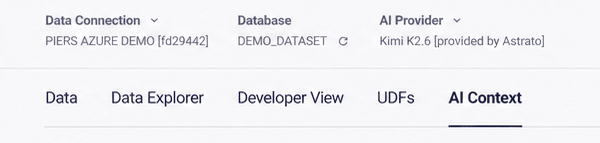
Section titled “Where to find it”Semantic Layer → AI Context
The AI Context tab sits alongside:
-
Data
-
Data Explorer
-
Developer View
-
UDFs
What AI Context does
Section titled “What AI Context does”AI Context helps AI features:
-
Understand your business terminology
-
Interpret metrics correctly
-
Avoid common misunderstandings
-
Apply company-specific rules
-
Generate more accurate summaries and insights
-
Maintain consistency across workbooks
The context is automatically passed to downstream AI capabilities connected to the Semantic Layer.
What to include
Section titled “What to include”Add any context that helps AI understand your business and data better.
Recommended areas:
-
Business overview and goals
-
Key definitions and metrics
-
Important data notes and rules
-
Terminology and acronyms
-
Preferred response style
-
Any caveats or exclusions
Example Context to provide
Section titled “Example Context to provide”Retail business context
Section titled “Retail business context”Gross Margin should always exclude refunded orders.
Store performance should prioritize same-store growth where possible.
Customers are considered active if they purchased within 90 days.
Finance metrics guide
Section titled “Finance metrics guide”ARR refers to Annual Recurring Revenue.
Pipeline values should use weighted pipeline unless specified otherwise.
Forecast categories follow Salesforce forecast stages.
SaaS KPI definitions
Section titled “SaaS KPI definitions”Churn Rate = Lost Customers / Starting Customers.
Expansion Revenue includes upgrades and seat increases only.
MRR excludes one-time onboarding fees.
Character limits
Section titled “Character limits”AI Context supports long-form text.
Recommended best practices:
-
Keep instructions clear and structured
-
Use bullet points where possible
-
Include definitions for important metrics
-
Avoid contradictory instructions
-
Focus on business context rather than technical implementation details
Behaviour
Section titled “Behaviour”-
AI Context is stored at Semantic Layer level
-
Changes persist after save/reload
-
Updates apply to connected AI features after save
-
Empty AI Context is supported
-
AI Context is shared across connected workbooks using the Semantic Layer
Permissions
Section titled “Permissions”Users must have permission to edit the Semantic Layer in order to modify AI Context.
Users without edit access can still benefit from AI Context through downstream AI capabilities.
Using Parameters with AI context
Section titled “Using Parameters with AI context”Parameters help avoid duplicating AI Context across multiple Semantic Layers or customers.
Typical use cases include:
-
OEM and embedded analytics
-
Multi-tenant deployments
-
White-label products
-
Localization
-
Environment-specific AI behaviour
-
Customer-specific terminology
-
Dynamic branding
Parameters allow AI Context to become dynamic and reusable across tenants, customers, regions, brands, or environments.
Instead of hardcoding values directly into the context, placeholders can be inserted and populated at runtime.
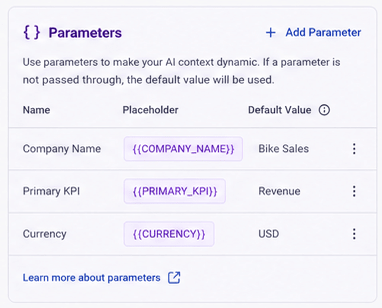
ℹ️ If a parameter is not passed through dynamically, the configured default value will be used.
Parameter syntax
Section titled “Parameter syntax”Parameters use double curly bracket syntax: #{{PARAMETER_NAME}}
Example:
You are an analytics assistant for #{{COMPANY_NAME}}.Focus on #{{PRIMARY_KPI}} when discussing performance.Adding a parameter to AI Context
Section titled “Adding a parameter to AI Context”Use the:
+ Add Parameter
button within the AI Context editor.
Each parameter supports:
Property | Description |
Name | Internal parameter name |
Placeholder | Generated placeholder syntax |
Default Value | Fallback value if parameter is not passed through |
Description | Optional explanation of the parameter |
Type | Text, Number, Boolean (future support) |
Default values for parameters in AI Context
Section titled “Default values for parameters in AI Context”Default values ensure AI Context continues working even when parameters are not dynamically supplied.
Example:
Parameter | Default Value |
COMPANY_NAME | Bike Sales |
PRIMARY_KPI | Revenue |
CURRENCY | USD |
If COMPANY_NAME is not passed through at runtime, it automatically resolves to the default value: Bike Sales
Example AI Context with parameters
Section titled “Example AI Context with parameters”You are an analytics assistant for #{{COMPANY_NAME}}.Primary reporting currency is #{{CURRENCY}}.Focus on #{{PRIMARY_KPI}} when discussing performance trends.